Best RGB USB Hub for Graphic Designers' Desk Setups

Port count is not what decides an RGB USB hub. Power delivery and cable reach are, and only two of these six publish a wall adapter figure. Here is how the six compare, and which one belongs under a designer's monitor arm.

By Lamar CalhounUpdated 17 min read
On this page
- Best RGB USB hub for graphic designers at a glance
- How I screened these six RGB USB hubs
- Powered or bus-powered: which does your drive need?
- 1. ZIUMIER USB Hub 7 Port — Best overall
- 2. RSHTECH RGB USB Hub RSH-518R — Best premium
- 3. JoyReken 7-Port USB 3.0 Hub — Best for heavy use
- 4. ZIUMIER Powered USB Hub — Best for beginners
- 5. FEMORO USB A Hub — Best budget pick
- 6. JoyReken USB Hub 3.0 with base — Best for families
- Does a hub help a graphic designer specifically?
- Cable length, orientation and where the hub actually sits
- What the listings don't tell you
- The verdict
- FAQ
The best RGB USB hub for graphic designers is the ZIUMIER 7-Port L90, because it pairs seven USB 3.0 ports rated at 5Gbps with per-port switches, a 3.3 ft cable and a 2-year warranty. If you plug in external drives that draw real current, the RSHTECH RSH-518R and its 20W (5V/4A) adapter is the safer buy. Get this wrong and the failure is not cosmetic: an underfed hub drops a drive mid-export, and a corrupted working file costs a day. Port count is the number everyone reads first. It is not the one that decides this.
Best RGB USB hub for graphic designers at a glance
| Pick | Ports | Powered? | Price |
|---|---|---|---|
Best overall ZIUMIER USB Hub 7 Port |
7 | Bus-powered 3.3 ft cable |
Check Price |
Best premium RSHTECH RGB USB Hub RSH-518R |
7 | Yes, 20W (5V/4A) adapter | Check Price |
Best for heavy use JoyReken 7-Port USB 3.0 Hub |
7 | USB-C side port for extra power | Check Price |
Best for beginners ZIUMIER Powered USB Hub |
10 | Yes, 24W (12V/2A) supply | Check Price |
Best budget pick FEMORO USB A Hub |
4 | Bus-powered | Check Price |
Best for families JoyReken USB Hub 3.0 with base |
7 | Bus-powered 2 ft cable |
Check Price |



How I screened these six RGB USB hubs
I started from the published listing data and nothing else. Every hub here had to state a USB 3.0 spec, an RGB lighting feature and a port count I could compare against the others. Anything that only listed "multiple ports" without a number got cut, because a number you cannot check is not a number.
Three screens did the real work:
- A published transfer figure. All six claim 5Gbps on USB 3.0. That is the floor, not a differentiator.
- A stated power arrangement. Two publish a wall adapter wattage. One publishes a supplementary USB-C input. Three are silent, which I treated as bus-powered.
- A comparable physical figure. Cable length, weight or dimensions. Three of the six list a cable length, two list a weight, two list outer dimensions.
What survived is a set that splits cleanly. Two hubs have their own power. Four ride on the port they plug into. That split, not the RGB, is what separates a hub that holds a portable SSD steady from one that drops it.
Worth saying plainly: none of these listings mentions colour accuracy, calibration, or anything else specific to design work. The best RGB USB hub for graphic designers is chosen on connectivity and stability, and I have judged them on exactly that.
Powered or bus-powered: which does your drive need?
Here's the trick with USB hubs. A single USB 3.0 port on your machine supplies a fixed budget of current. Split that across seven ports and every device shares the same pool. A keyboard, a mouse and a drawing tablet barely notice. A bus-powered 2.5-inch external drive spinning up can notice a great deal.
That is why the wattage figures matter more than the port count in this set:
- RSHTECH RSH-518R: 20W (5V/4A) adapter, per the listing.
- ZIUMIER 10-port L100: 24W supply, listed as 12V/2A.
- JoyReken J7-WF-BK-2FT: no adapter, but a side USB-C port the brand says "supplies additional power to the hub".
- ZIUMIER L90, FEMORO FE028-A2, JoyReken base model: no published power supply.
So the rule is simple. Bus keyboards, mice, tablets, dongles and flash drives: any of the six will do. Spinning drives, multiple SSDs, a card reader dumping a full shoot: buy one with its own adapter, and put the drive on the powered hub rather than daisy-chained behind another one.
The other half of the story is per-port switches. Four of these six publish individual on/off control. That means you can park a drive on the hub, leave it physically plugged, and cut its power when you are not using it. Fewer spin-ups, less heat, less draw on the shared budget.
1. ZIUMIER USB Hub 7 Port — Best overall
Seven switched USB 3.0 ports, a 3.3 ft cable and a 2-year warranty make this the most complete bus-powered hub in the set.
Best for: a designer running a tablet, card reader and two drives off one laptop port Skip it if: you need a wall adapter for spinning external drives
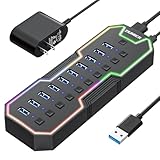
What sets the L90 apart here is the combination, not any single figure. Seven ports puts it level with three others. The 3.3 ft cable ties it with the RSHTECH for the longest reach in this set, and that is double the 2 ft cable on both JoyReken models. Reach decides whether the hub sits on your desk surface or behind a monitor riser, and 3.3 ft usually gets you around the back of a display.
ZIUMIER publishes a 2-year warranty, matching the 10-port L100 as the longest stated cover here. The per-port switches each carry their own LED, so you can see at a glance which ports are live. The RGB strip runs on its own button, and ZIUMIER says you can toggle the lighting independently of the ports. That matters if you work in a dark room and want the glow off during colour work.
It is also the second-cheapest of the six, which is the part that makes it the default. You are paying near the bottom of this set for the joint-longest cable and the joint-longest warranty.
The trade-off is power. There is no published adapter, so this hub shares your machine's port budget. Put a bus-powered spinning drive on it alongside six other devices and you are testing the limits.
Pros:
- Seven USB 3.0 ports at a claimed 5Gbps
- Joint-longest cable in this set at 3.3 ft
- Individual switches with per-port LED indicators
- 2-year warranty, the longest stated here
- Second-cheapest of the six
Cons:
- No published power adapter for demanding drives
- Only one seller lists it
- No published weight or dimensions to plan desk space
- Lies flat, so it eats more surface area than the vertical picks
2. RSHTECH RGB USB Hub RSH-518R — Best premium
The only pick with both a 20W adapter and a detachable USB-A/USB-C cable, which makes it the one that handles external drives without argument.

Best for: anyone plugging in bus-hungry external drives all day Skip it if: your desk has no spare wall socket
This is the most expensive pick here, and it is the only one that earns the position on published capability rather than styling. RSHTECH lists a 20W (5V/4A) power adapter in the box, alongside a 3.3 ft 2-in-1 cable with both USB-A and USB-C ends. That cable is the single most practical detail in this whole roundup. One hub covers a desktop tower and a USB-C-only laptop, with no dongle in between.
At 0.79 x 5.08 x 1.89 in it is the slimmest published footprint here, which suits a hub that lives along the front edge of a desk. The seven switches are touch-activated rather than mechanical: tap to turn on, hold two seconds to turn off, per RSHTECH. The lighting goes further than the rest too, with 14 modes claimed, including static single colours. Static is the mode you want if a breathing RGB strip in your peripheral vision bothers you during long retouching sessions.
The warranty is stated as 18 months for non-human damage, which is shorter than both ZIUMIER hubs. Three sellers stock it, more than any other pick.
The catch is what a powered hub always costs you: a wall socket, an adapter brick and one more cable in the run. If your desk is already a nest, the tidier bus-powered picks are easier to live with.
Pros:
- 20W (5V/4A) adapter included for drive-heavy setups
- Detachable USB-A and USB-C cable, 3.3 ft
- Slimmest published footprint at 0.79 x 5.08 x 1.89 in
- 14 claimed lighting modes, including static
- Several sellers stock it
Cons:
- The most expensive pick here
- 18-month warranty, shorter than both ZIUMIER hubs
- Needs a mains socket and adds an adapter brick
- Touch switches are easier to trigger by accident than mechanical ones
3. JoyReken 7-Port USB 3.0 Hub — Best for heavy use
A vertical seven-port hub with a side USB-C input for extra power, and the only pick that publishes both weight and dimensions.

Best for: cramped desks where the hub has to stand upright Skip it if: you want individual switches for every port
This is the pick for a desk with no spare flat space. The body measures 4.5 x 1.02 x 0.47 in and weighs 6.74 oz, and it is the only hub here that publishes both numbers. That weight is worth noting: at 6.74 oz it is more than four times the FEMORO's 1.45 oz, which is exactly what you want in something standing upright with seven cables pulling at it.
The clever part is the side USB-C port. JoyReken says it supplies additional power to the hub and keeps data transfer stable, specifically when external hard drives are connected. That puts this hub in a middle tier. It is not a mains-powered unit like the RSHTECH, but you can feed it more current from a charger you probably already own. For a designer moving between a docked desktop and a laptop, that flexibility is genuinely useful.
The included cable is 2 ft, the shortest published length in this set alongside the other JoyReken. Two feet is fine on a desk, tight if the hub needs to reach a tower on the floor. The RGB is a single night-light on the side, toggled by one button press.
Where it loses is control. The listing describes one button for the light and no per-port switches, so unlike four other picks here you cannot cut power to a single port.
Pros:
- Vertical body frees desk surface, 4.5 x 1.02 x 0.47 in
- USB-C side input for supplementary power
- Heaviest small hub here at 6.74 oz, so it stays put
- Mid-range price for a powered-capable design
Cons:
- Short 2 ft cable
- No individual port switches
- No published warranty term
- RGB is a single side light rather than a full strip
4. ZIUMIER Powered USB Hub — Best for beginners
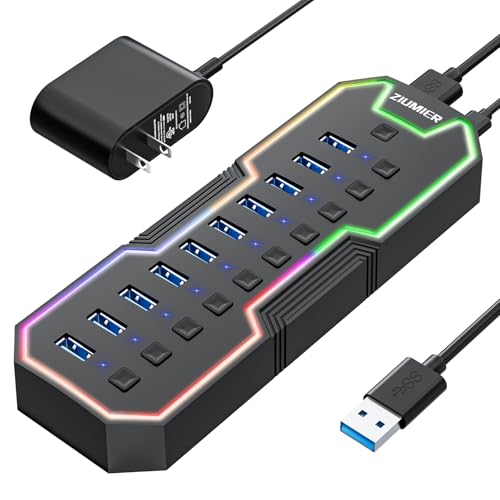
Ten switched ports and a 24W supply mean you plug everything in once and stop thinking about ports.
Best for: a first big desktop build with more peripherals than ports Skip it if: you travel with your gear
Ten ports is three more than any other pick here, and it is paired with the highest published power figure in the set: 24W, listed as 12V/2A. That combination is why I'd point a first-time buyer at the L100. You do not have to work out which four devices deserve a port. You plug in the keyboard, mouse, tablet, card reader, two drives, a webcam, a microphone, a dongle and a flash stick, and you still have room.
Every port gets its own switch with an LED, same as the L90, so you can shut off the drives when they are idle and leave the input devices live. ZIUMIER publishes a 2-year warranty here too, matching the L90 as the longest cover in this set. The RGB strip has a dedicated button.
Price sits mid-range for these six, which is fair for ten powered ports and the joint-best warranty.
Two honest limits. Nothing in the listing gives a cable length, a weight or a body size, so if you are planning around a monitor arm or a drawer you are buying blind on physical fit. And a hub with a mains brick and ten ports is a permanent desk fixture. It is the wrong shape for a bag. Only one seller lists it, so choice is limited.
Pros:
- Ten USB 3.0 ports, the most in this set
- 24W supply, the highest published wattage here
- Individual switch and LED on every port
- 2-year warranty, joint-longest here
Cons:
- No published cable length, weight or dimensions
- Mains adapter makes it unsuitable for travel
- Ten ports is more than most single-machine setups need
- Only one seller lists it
5. FEMORO USB A Hub — Best budget pick
The cheapest and lightest pick here at 1.45 oz, which makes it the one that lives in a laptop sleeve rather than on a desk.

Best for: a laptop bag, a second desk, or a cheap fourth port Skip it if: you need more than four ports or per-port switches
The FEMORO FE028-A2 is the cheapest of the six and it weighs 1.45 oz, less than a quarter of the JoyReken vertical hub. That is the whole argument for it. It goes in a sleeve pocket, comes out at a client's desk or a co-working table, and gives a thin laptop four USB-A ports at a claimed 5Gbps.
FEMORO calls the shell a "dimensional diamond" design with a colour LED indicator, and mentions thickened PVC with 28/24AWG copper cores. Take the material claims as the manufacturer's. What is not a claim is the port count: four, listed as the size. That is three fewer than most of this set, and it is the right number for a laptop that already has one or two ports of its own.
The listing also mentions a heat dissipation design, which on a small unpowered hub with an SSD attached is not nothing.
Where it falls short is everything a desk hub does. No published warranty term in the specifications, no individual switches, no power adapter, and a body small enough that a stiff USB cable can drag it around. There is no published cable length either, so plan on it sitting close to the machine. As a second hub it is excellent value. As your only hub for a full design setup, four ports runs out fast.
Pros:
- Cheapest pick in this set
- Lightest at 1.45 oz, genuinely portable
- Four USB 3.0 ports at a claimed 5Gbps
- Heat dissipation design noted in the listing
Cons:
- Four ports only, the fewest here
- No individual port switches
- No warranty term in the published specifications
- Light enough to be dragged by a stiff cable
6. JoyReken USB Hub 3.0 with base — Best for families
A seven-port upright hub on a weighted-style base, built more around how it looks on a shared desk than what it powers.

Best for: a shared family desk where the hub sits in plain view Skip it if: you want the longest warranty in this set
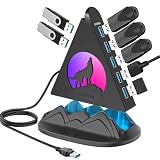
This one is the styling pick, and there is no point pretending otherwise. JoyReken leads with a "howling wolf" side design and a pyramid top, plus an RGB night light. On a shared desk in a living room or a kid's study corner, that is a feature rather than a distraction, and the base gives it a footprint that resists tipping when seven cables are attached.
Functionally it delivers what most of this set delivers: seven USB 3.0 ports, a claimed 5Gbps, and a 2 ft extension cable. The base is the differentiator against the other JoyReken, which stands on its own body. If the hub is going to be knocked by an elbow or a cat, a base earns its keep.
It is the second-most expensive pick here, and that is the problem. It publishes a 12-month warranty, the shortest stated term in this set, against ZIUMIER's 2 years at a lower price. There is no adapter, no USB-C power input and no per-port switching mentioned, so it does less than the JoyReken vertical hub that costs less.
Buy it because you want the look on a visible desk. If the hub lives behind a monitor where nobody sees it, the L90 gives you more for less.
Pros:
- Seven USB 3.0 ports at a claimed 5Gbps
- Weighted-style base for stability with cables attached
- Vertical layout saves desk surface
- RGB night light on the side panel
Cons:
- 12-month warranty, the shortest stated here
- Second-highest price for no extra published capability
- No power adapter or USB-C power input
- No per-port switches mentioned
Does a hub help a graphic designer specifically?
Straight answer: not in the way the search phrase implies. None of these listings mentions colour management, display output, monitor daisy-chaining or anything a design workflow uniquely needs. What they do is turn one USB-A port into four, seven or ten. So the question you should actually be asking is a different one.
Count what you plug in on a working day:
- Drawing tablet or pen display
- Keyboard and mouse, or a trackpad dongle
- SD or CF card reader
- Scratch SSD for large working files
- Archive drive for finished jobs
- Colour calibration device, if you use one
- Headset or audio interface
That is seven items before anything unusual. A laptop with two USB-C ports and no USB-A cannot do it. So the best RGB USB hub for graphic designers is really the hub that matches your device count and their power draw, with lighting as the part that makes the desk look how you want it to.
One more thing to judge for yourself. Data-only hubs like these do not carry video. If you also need a second display or Ethernet, you are shopping for a dock, not a USB hub, and none of these six will do that job.
Cable length, orientation and where the hub actually sits
Cable length is the specification buyers skip and then regret. Three of these six publish one:
- ZIUMIER L90: 3.3 ft (100cm)
- RSHTECH RSH-518R: 3.3 ft, and it is detachable
- Both JoyReken hubs: 2 ft
The gap between 2 ft and 3.3 ft sounds trivial. It is the difference between reaching a tower on the floor beside your desk and not reaching it. If your machine is under the desk, take the 3.3 ft option. If the hub plugs into a laptop sitting a hand's width away, 2 ft is plenty and the shorter cable is tidier.
Orientation is the second placement decision. Two picks stand upright: the JoyReken J7-WF-BK-2FT at 4.5 x 1.02 x 0.47 in, and the JoyReken base model. Vertical hubs cost you almost no desk surface and make the ports easy to see, which suits a designer swapping card readers all day. Flat hubs like the RSHTECH, at 0.79 x 5.08 x 1.89 in, tuck under a monitor riser or along the desk edge where nothing catches on them.
And the RSHTECH's detachable cable deserves one more mention. It is the only pick here where the cable is a separate part. Cables are the thing that fail on hubs, and a captive cable failing means a dead hub.
What the listings don't tell you
Most shoppers miss how much of a USB hub listing is unstated. Here is what is genuinely absent across these six.
Chipset. Not one names the controller inside. FEMORO says "built-in high-performance chips" and that is as specific as it gets. The chipset determines how well seven devices behave at once, and none of these listings lets you compare it.
Simultaneous bandwidth. All six claim 5Gbps. That is the spec ceiling for the upstream connection, shared by every port. Two SSDs writing at once split it. No listing here explains that, and no listing here publishes a real-world figure.
Power per port. Only total wattage appears, on the two mains-powered picks. What each individual port can deliver is unstated everywhere.
Physical fit. Two hubs publish outer dimensions. Four do not. Both ZIUMIER hubs give a model number and a warranty but no body size, so measure your gap before ordering.
Availability of spares. Only the RSHTECH has more than one seller. For the other five, a single seller lists them, which is worth knowing if you plan to buy two matching hubs later.
The verdict
Split this set by what you are willing to spend and the picture is clear.
At the entry level, the ZIUMIER L90 is the best RGB USB hub for graphic designers and the one I'd start with. Seven switched USB 3.0 ports, a 3.3 ft cable and a 2-year warranty at the second-lowest price in this set is the strongest value here, full stop. The FEMORO sits below it as the cheapest and lightest at 1.45 oz, and it is the right call only as a travel hub or a second unit, because four ports will not carry a full desk.
In the middle, the JoyReken J7-WF-BK-2FT buys you a vertical 4.5 x 1.02 x 0.47 in body and a USB-C side input for extra power, which is worth the step up if desk space is your constraint. The ZIUMIER L100 buys you ten ports and a 24W supply, which is worth it if your device count is genuinely into double figures.
At the top, the RSHTECH RSH-518R is the one to buy if drives are central to your work. Its 20W (5V/4A) adapter and detachable USB-A/USB-C cable are capabilities nothing cheaper here matches. The JoyReken base model, second-priciest with a 12-month warranty and no adapter, is the one pick I would only choose on looks.
FAQ
Is an RGB USB hub worth it for design work?
An RGB USB hub is worth it if you are short on ports, and the lighting is a bonus rather than the reason. All six picks here claim 5Gbps USB 3.0, so you get the connectivity of any decent hub plus a strip or night light you can switch off. Four of the six let you cut power to individual ports, which is the feature that actually helps a drive-heavy workflow.
How much should I spend on the best RGB USB hub for graphic designers?
How much you should spend depends entirely on whether you attach powered drives. Bus-powered devices only, and the second-cheapest pick, the ZIUMIER L90, covers you with seven ports and a 2-year warranty. Multiple external drives push you to the RSHTECH RSH-518R and its 20W adapter, which sits at the top of this set. The four-port FEMORO is the floor.
Do these RGB USB hubs need their own power supply?
These RGB USB hubs split two ways on power. The ZIUMIER L100 lists a 24W (12V/2A) supply and the RSHTECH RSH-518R lists a 20W (5V/4A) adapter. The JoyReken J7-WF-BK-2FT has a USB-C side port the brand says adds power. The ZIUMIER L90, FEMORO and JoyReken base model publish no adapter, so treat them as sharing your computer's port budget.
ZIUMIER L90 or RSHTECH RSH-518R: which should I buy?
Choosing between the L90 and the RSH-518R comes down to drives. Both give seven ports and a 3.3 ft cable. The L90 costs less and carries a 2-year warranty against RSHTECH's 18 months. The RSHTECH adds the 20W adapter, a detachable USB-A/USB-C cable and 14 claimed lighting modes. No mains-powered drives, take the L90. Drives all day, take the RSHTECH.
What mistake do buyers make with USB hubs?
The mistake buyers make is treating port count as the only number. Ten ports on a shared 5Gbps upstream link is still 5Gbps total, split across everything plugged in. Cable length matters more than most people expect too: 2 ft will not reach a tower under a desk, while the 3.3 ft cables on the ZIUMIER L90 and RSHTECH usually will.
Pick the hub around your two heaviest devices, not your lightest seven. Write down what draws real current, then check whether your shortlist publishes a wall adapter figure. For most design desks running a tablet, a reader and a couple of drives, the ZIUMIER L90 is the sensible default: it is near the bottom of this set on price, joint-top on warranty at 2 years, and it gives you the switches to shut idle drives down instead of leaving seven devices fighting over one port's worth of current. Move up to the RSHTECH only when the drives never unplug.