Best Budget Small Form Factor Desktop for Home Work

Six compact desktops compared on storage type, footprint and processor, with a clear winner and the exact conditions that flip the pick to a mini PC or an entry HP.

By Lamar CalhounUpdated 13 min read
On this page
- What actually decides a budget compact desktop?
- Best budget small form factor desktop computer at a glance
- How I screened these six down
- SFF or micro: how small do you really need?
- 1. Dell Optiplex 5050 Small Form Factor — Best overall
- 2. HP ProDesk 600 G1 SFF Slim Business Desktop Computer — Best budget pick
- 3. Dell OptiPlex 3050 Micro Form Factor Desktop Computer — Runner-up
- 4. HP EliteDesk 800 G1 SFF High Performance Business Desktop — Best for beginners
- 5. KAMRUI Pinova P2 Mini PC — Best premium
- Renewed vs new: what the listings hide
- When a different pick wins
- The verdict
- FAQ
The best budget small form factor desktop computer is the Dell Optiplex 5050 SFF, because it pairs an Intel Core i7-7700 with a 512GB NVMe SSD in a 3.7-inch-thick chassis. If your desk is tiny or you want the newest hardware, the KAMRUI Pinova P2 mini PC wins instead at 1.26 lb. Most buyers compare processor names first. That is not what splits this field.
What actually decides a budget compact desktop?
Here's the misconception worth killing early. Buyers line up processor names, spot the i7 in one listing and the i5 in another, and stop there. That is the wrong lens for a budget compact desktop.
Two things decide it. First, storage type. An SSD boots and loads apps in seconds; a spinning hard drive does not, and the gap is bigger than any processor difference in this set. Second, footprint, because "small form factor" and "micro" are not the same size, and the one you can actually fit is the one that matters.
The best budget small form factor desktop computer for you is the one whose storage and size match how you work. A short list of what to weigh:
- SSD vs HDD. An NVMe or SSD boot drive is the single biggest speed factor here.
- Chassis size. A true SFF box is inches thick; a micro or mini PC is smaller still.
- Processor generation. Newer generations run cooler and support current features.
- Warranty length. Most of these carry only 90 days; one carries a year.
Sort by those and the ranking almost writes itself.
Best budget small form factor desktop computer at a glance
| Pick | Storage | Footprint | Price |
|---|---|---|---|
Best overall Dell Optiplex 5050 SFF |
512GB NVMe SSD | 3.7 x 11.5 x 11.4 in | Check Price |
Best budget pick HP ProDesk 600 G1 SFF |
500GB HDD | 10 x 14 x 3 in | Check Price |
Runner-up Dell OptiPlex 3050 Micro |
256GB SSD | 7 x 7.1 x 1.3 in | Check Price |
Best for beginners HP EliteDesk 800 G1 SFF |
256GB SSD + 1TB HDD | 3.9 x 14.9 x 13.3 in | Check Price |
Best premium KAMRUI Pinova P2 Mini PC |
256GB SSD | 1.63 x 5.04 x 5.04 in | Check Price |




How I screened these six down
I compared the published specifications side by side and let three questions do the cutting. My rule was simple. If a listing could not answer a buyer's first practical question, it lost points.
The criteria, weighted in this order:
- Storage type and size, weighted heaviest. A boot SSD changes daily use more than anything else on the spec sheet. The HDD-only HP ProDesk keeps its place only on price.
- Footprint, weighted second. These range from a 1.3-inch-thick micro to a 3-inch-thick tower on its side. That range is the whole point of the category.
- Warranty and recency, weighted third. Four of the five ship as renewed units with a 90-day window. One ships new with a year.
Why those weights? Because a compact desktop is bought to sit somewhere small and start fast. Processor headline speed came fourth, since every machine here clears the bar for browsing and office work.
One caution up front. The search term asks for "budget," and these listings vary from an entry HP to a premium KAMRUI. Amazon's results mix the tiers, so treat budget as your own ceiling and read the price positions I flag, not the qualifier in the search box.
SFF or micro: how small do you really need?
This is where most people pick wrong. "Small form factor" is a specific chassis type, roughly 3 to 4 inches thick lying flat. A micro or mini PC is a different, smaller class again.
The size gap in this set is large:
- The Dell OptiPlex 3050 Micro measures 7 x 7.1 x 1.3 in and weighs 4.1 lb.
- The KAMRUI Pinova P2 measures 1.63 x 5.04 x 5.04 in and weighs 1.26 lb.
- The Dell Optiplex 5050 SFF measures 3.7 x 11.5 x 11.4 in and weighs 10.7 lb.
- The HP ProDesk 600 G1 measures 10 x 14 x 3 in and weighs 15.4 lb.
The trade is real. A larger SFF box like the Dell 5050 gives you internal room and a faster i7. A micro or mini gives you a machine that hides behind a monitor or mounts to a wall, at the cost of upgrade space. Decide where it lives before you decide what runs inside it.
1. Dell Optiplex 5050 Small Form Factor — Best overall
The Dell Optiplex 5050 SFF wins because it packs the fastest processor and the biggest, fastest storage in this set into a chassis you can still open.
Best for: someone who wants the fastest processor and biggest SSD in this set Skip it if: you need the smallest possible footprint
What sets this one apart is the pairing of speed and storage. Dell lists an Intel Core i7-7700 clocked at 3.6GHz with turbo up to 4.2GHz, and it is the only quad-core i7 here. Storage is a 512GB NVMe SSD, the largest solid-state drive in the set and the only NVMe drive, so app loads and boot times sit at the top of this group. Memory is 16GB DDR4.
The chassis is 3.7 x 11.5 x 11.4 in at 10.7 lb, a true SFF box you can lay flat or stand up. Dell says it ships with a wired keyboard and mouse and Windows 11 Pro. This is the best budget small form factor desktop computer here because nothing else combines the i7, the NVMe drive and an openable case.
The trade-off is size and coverage. It is far larger than the micro or mini picks, and the listing states only a 90-day limited warranty against the KAMRUI's full year. It also sits in the pricier half of this set.
Pros:
- Only quad-core i7-7700 in this set
- Largest and only NVMe SSD, 512GB
- 16GB DDR4 memory
- Openable SFF chassis for upgrades
- Keyboard and mouse included per listing
Cons:
- Only a 90-day limited warranty
- Much larger than the micro and mini picks
- Sits in the pricier half of this set
- 2019 renewed unit, not new
2. HP ProDesk 600 G1 SFF Slim Business Desktop Computer — Best budget pick
The HP ProDesk 600 G1 is the lowest entry point here, and it earns that spot on price alone.

Best for: a basic browsing and office machine at the lowest entry Skip it if: you want fast boot times from an SSD
This is the cheapest of the five, and it reads that way on the spec sheet. HP lists an Intel Core i5 quad-core at 3.2GHz, 8GB of RAM, and a 500GB hard drive rather than an SSD. It also includes a DVD optical drive, the only optical drive in this set, which matters if you still handle discs.
The catch is the storage. A 500GB HDD boots and loads slower than every solid-state pick here, and that gap shows up every time you turn it on. The box measures 10 x 14 x 3 in and weighs 15.4 lb, the heaviest unit in the group. HP describes it as certified refurbished, tested and cleaned, with Windows 11 Pro and a keyboard and mouse.
Buy it if you want the lowest price for browsing, email and documents and can live with a spinning drive. The trade-off against the rest of this set is speed and a short 90-day warranty.
Pros:
- Lowest entry price in this set
- Includes a DVD optical drive
- Windows 11 Pro and peripherals included
- Quad-core i5 at 3.2GHz per listing
Cons:
- HDD, not an SSD, so slower boots
- Only 8GB RAM, least in the set
- Heaviest and one of the bulkiest boxes
- 90-day warranty only
3. Dell OptiPlex 3050 Micro Form Factor Desktop Computer — Runner-up
The Dell OptiPlex 3050 Micro delivers SSD speed in a body barely bigger than a paperback, which is why it edges into the runner-up spot.
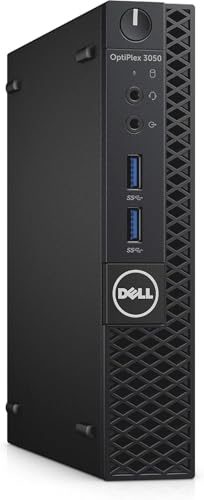
Best for: a tiny desk or a wall-mounted setup with SSD speed Skip it if: you need lots of internal storage bays
Size is the story here. At 7 x 7.1 x 1.3 in and 4.1 lb, this is the second-smallest machine in the set and easily tucks behind a monitor. Dell lists an Intel Core i5-7500T at 2.7GHz, a lower-power T-series chip suited to a compact case, plus 8GB DDR4 and a 256GB SSD.
That SSD is the reason it beats the HP ProDesk on daily feel despite a lower entry price on that HP. Fast boots and quick app loads come standard. Dell also lists USB 3.0, DisplayPort, WiFi and Ethernet, so dual monitors and wireless are covered without add-ons.
The runner-up rather than winner call comes down to headroom. The i5-7500T is slower than the winner's i7, the 256GB SSD is half the winner's capacity, and a micro chassis leaves little room to add drives later. The listing states a 90-day window. Pick it when the desk space, not the internals, is your hard limit.
Pros:
- Second-smallest body, 7 x 7.1 x 1.3 in
- 256GB SSD for fast boots
- WiFi and DisplayPort listed
- Lightest Dell here at 4.1 lb
- Second-cheapest of the five
Cons:
- Low-power i5-7500T, slower than the i7
- 256GB SSD, half the winner's capacity
- Little room for internal expansion
- Only a 90-day window listed
4. HP EliteDesk 800 G1 SFF High Performance Business Desktop — Best for beginners
The HP EliteDesk 800 G1 pairs a fast boot SSD with a big storage drive, so a first-time buyer gets speed and space without choosing between them.

Best for: a first desktop with both an SSD and a large hard drive Skip it if: you want the newest processor generation
This is the only machine in the set with a dual-drive layout. HP lists a 256GB SSD as the boot drive plus a 1TB hard drive for files, which is friendly for a beginner who does not want to manage storage tightly. RAM is 16GB, matching the winner and the KAMRUI for the most in this group.
The processor is an Intel Quad Core i5-4590 rated up to 3.7GHz. HP also notes 4K dual-display support, so two monitors work out of the box. The chassis is 3.9 x 14.9 x 13.3 in, the longest footprint here, so measure your desk. It is described as certified refurbished with Windows 11 Pro and peripherals.
Notably, this listing states a warranty value of 1 rather than the 90 days on the other renewed units. The trade-off against the winner is the older processor generation and a bulkier body. Against the KAMRUI, it is a much larger machine.
Pros:
- Only dual-drive pick, 256GB SSD plus 1TB HDD
- 16GB RAM, most in the set
- 4K dual-display support per listing
- Keyboard, mouse and Windows 11 Pro included
Cons:
- Older i5-4590 processor generation
- Longest footprint in the set
- Renewed unit, not new
- SSD portion smaller than the winner's 512GB
5. KAMRUI Pinova P2 Mini PC — Best premium
The KAMRUI Pinova P2 is the smallest, newest and only unit here that ships new with a full year of coverage.

Best for: the smallest and newest machine with a 1-year warranty Skip it if: you want a full SFF chassis you can open and upgrade
This is the outlier, and a strong one. At 1.63 x 5.04 x 5.04 in and 1.26 lb, it is by far the smallest and lightest pick, and the only one released in 2024. KAMRUI lists an AMD Ryzen 7330U with 4 cores and 8 threads up to 4.3GHz, 16GB LPDDR4X RAM and a 256GB SSD. It carries a 1-year manufacturer warranty, the longest here.
KAMRUI also claims triple 4K display output through HDMI 2.0, DisplayPort 1.4 and USB-C, plus a 10Gbps USB 3.2 Gen2 Type-C port. Those are the manufacturer's stated figures, useful if you run several monitors.
It sells faster than the rest of this set, and it sits in the pricier half. The trade-off is clear: a mini PC this small gives up the openable chassis and internal drive bays of the SFF picks, so plan your storage from the start. Pick it when size and a fresh warranty outrank upgrade room.
Pros:
- Smallest and lightest here, 1.26 lb
- Only new 2024 unit in the set
- Longest warranty, 1 year
- Triple 4K output claimed by KAMRUI
- 16GB RAM and a 256GB SSD
Cons:
- No openable chassis or drive bays
- 256GB SSD, half the winner's capacity
- Sits in the pricier half of the set
- 4K claims are the maker's, unverified here
Renewed vs new: what the listings hide
Four of these five are sold as renewed or certified refurbished. Only the KAMRUI ships new. That single line changes what you should expect.
Renewed listings here describe a process of functionality testing, basic cleaning, inspection and repackaging. Cosmetic wear is possible. More important for your wallet, the renewed Dell and HP units state a 90-day limited warranty, while the HP EliteDesk listing shows a warranty value of 1 and the new KAMRUI states a full year.
What the listings do not tell you:
- Which components were replaced during refurbishment
- The battery or drive age on a renewed unit
- Whether the included keyboard and mouse are new or refurbished
None of that is disqualifying. Renewed business desktops are a well-worn budget path. Just weigh the short coverage window against the price you save, and back up your files early.
When a different pick wins
The Dell 5050 is my default, but three concrete conditions flip it.
- If your desk space is the hard limit, the KAMRUI Pinova P2 wins at 1.26 lb and a 5-inch square footprint. Nothing else here disappears behind a monitor like it does.
- If your budget is the hard limit, the HP ProDesk 600 G1 is the lowest entry point, provided you accept its 500GB HDD instead of an SSD.
- If you want one drive fast and one drive roomy, the HP EliteDesk 800 G1 is the only pick with both a 256GB SSD and a 1TB hard drive.
One more: if warranty length matters most, the KAMRUI's 1 year beats the 90-day coverage on the renewed Dell and HP units.
The verdict
If you want the fastest everyday machine that still opens for upgrades, buy the Dell Optiplex 5050 SFF. It is the only pick here with an i7-7700 and a 512GB NVMe SSD, and that combination lands ahead of everything else on speed. The cutoff is desk space and warranty. If either of those decides your purchase, the answer changes.
If your desk is small or you want new hardware with a full year of coverage, the KAMRUI Pinova P2 wins. It is the smallest at 1.26 lb, the only 2024 unit, and the only machine with a 1-year manufacturer warranty. Its exact advantage over the Dell is size and newness, not raw storage or an openable case, since it shares the same 256GB SSD tier as two other picks.
The threshold is simple. Above roughly a 3-inch-thick chassis, the Dell's speed and NVMe drive make it the better buy. Below that, when the machine has to be tiny or freshly warrantied, the KAMRUI takes it. The HP picks fill the edges: lowest price for the ProDesk, dual drives for the EliteDesk.
FAQ
Is a budget small form factor desktop worth it over a laptop?
A budget small form factor desktop is worth it when the machine stays in one place. You get an openable chassis on picks like the Dell 5050, easier storage upgrades, and full-size ports. A laptop wins only if you need portability. For a fixed home or office spot, these compact desktops deliver more speed per dollar and simpler repairs.
What is the best budget small form factor desktop computer for a tiny desk?
For a tiny desk, the best budget small form factor desktop computer is the KAMRUI Pinova P2 mini PC. It measures 1.63 x 5.04 x 5.04 in and weighs 1.26 lb, small enough to mount behind a monitor. The Dell OptiPlex 3050 Micro is the next smallest at 7 x 7.1 x 1.3 in and adds an openable Dell design.
Does an SSD matter more than the processor here?
An SSD matters more than the processor for daily use in this set. The gap between the HP ProDesk's 500GB HDD and the Dell 5050's 512GB NVMe SSD shows up on every boot and app load. All five processors clear the bar for browsing and office work, so put storage type first and treat the chip name as a tiebreaker.
Dell Optiplex 5050 or KAMRUI Pinova P2, which should I buy?
Choose the Dell Optiplex 5050 for speed and space: it has the i7-7700, a 512GB NVMe SSD and an openable case. Choose the KAMRUI Pinova P2 when size and warranty win, since it is 1.26 lb, ships new from 2024, and carries a 1-year manufacturer warranty against the Dell's 90-day window. Desk space usually decides it.
What is the biggest pitfall buying a renewed compact desktop?
The biggest pitfall buying a renewed compact desktop is the short warranty. Four picks here list only a 90-day limited window, and the listings do not name which parts were replaced. Renewed units are tested, cleaned and repackaged, but plan to back up your files early and factor the coverage gap against the money you save versus the new KAMRUI.
Start by deciding where the machine will live and how fast it must feel. Those two answers point at the Dell Optiplex 5050 SFF for most buyers, because its i7-7700 and 512GB NVMe SSD give you the quickest everyday experience in this group while still leaving the case openable for a later upgrade. If the spot is genuinely tiny or you want fresh hardware with a year of coverage, step across to the KAMRUI Pinova P2. Either way, check the current price on the listing and match the storage type to how you actually work.