Best Small Form Factor Desktop by Ports and RAM

Six compact desktops compared on the specs that decide a home-office buy: RAM, storage, display outputs and warranty length. The Blackview MP100 takes the top spot, with a Dell tower and two HP minis close behind.

By Lamar CalhounUpdated 14 min read
On this page
- Best small form factor desktop computer for remote workers at a glance
- How I screened these six down
- What actually decides a compact desktop?
- 1. Blackview MP100 Mini PC Ryzen 7430U — Best overall
- 2. Dell 2026 Tower PC Ect1250 — Best premium
- 3. MINIX NGC N512 Mini PC — Runner-up
- 4. Lenovo ThinkCentre M70q — Best for beginners
- 5. HP EliteDesk 800 G2 Mini — Best for pros
- 6. HP EliteDesk 800 G3 SFF — Best budget pick
- Does small form factor matter for remote work?
- New versus renewed: which should you buy?
- When a different pick wins
- The verdict
- FAQ
The best small form factor desktop computer for remote workers is the Blackview MP100 Mini PC, a 1.7 x 5 x 5 in box that pairs 16GB DDR4 RAM with a 512GB NVMe SSD and a stated 3-year warranty. If you want more headroom out of the box, the Dell Ect1250 tower ships with 32GB DDR5 and a 1TB SSD instead. The deciding split here is simple: RAM and storage you can live with, against a warranty you can lean on. Not screen count.
Best small form factor desktop computer for remote workers at a glance
| Pick | RAM / Storage | Warranty | Price |
|---|---|---|---|
Best overall Blackview MP100 Mini PC |
16GB DDR4 512GB SSD |
3 years | Check Price |
Best premium Dell Ect1250 Tower PC |
32GB DDR5 1TB SSD |
1 year | Check Price |
Runner-up MINIX NGC N512 Mini PC |
16GB DDR5 512GB SSD |
1 year | Check Price |
Best for beginners Lenovo ThinkCentre M70q |
16GB 512GB SSD |
Not listed | Check Price |
Best for pros HP EliteDesk 800 G2 Mini |
16GB DDR4 512GB SSD |
Renewed | Check Price |
Best budget pick HP EliteDesk 800 G3 SFF |
8GB 256GB SSD |
90-day | Check Price |



How I screened these six down
I started with the listings, not the marketing. My job was to line up the published specifications side by side and cut anything that couldn't back up a home-office claim. Three things got picks knocked down the order.
- Thin storage. The HP EliteDesk 800 G3 SFF lists just 8GB RAM and a 256GB SSD. That's the smallest pairing here, and it's why it lands at the budget end rather than the top.
- Short or missing warranty. Two picks publish no warranty at all in their specs. One renewed unit lists a 90-day window. That matters more than a spec sheet suggests.
- Fuzzy dimensions. A couple of "mini" listings quote box or shipping sizes that don't match a palm-sized chassis, so I leaned on the figures I could actually read.
What survived is a spread across the full price range: the cheapest of the six through to the most expensive pick here. Every one of them runs on an SSD, and every one claims at least dual-display output. From there, the deciding factors are RAM, warranty and how the ports line up with a real desk.
What actually decides a compact desktop?
Most guides for the best small form factor desktop computer for remote workers compare processor names first. That's the wrong lead. A remote worker running email, video calls, spreadsheets and a browser with thirty tabs is rarely CPU-bound. RAM and storage decide how the machine feels day to day.
Here's the order I'd actually weigh:
- RAM. 16GB is the comfortable floor for heavy multitasking. Five of six picks hit it; one sits at 8GB.
- Storage type and size. Every pick uses an SSD, so boot times are quick across the board. Capacity is the variable: 256GB to 1TB.
- Warranty. A published multi-year warranty is rare in this set. It's the Blackview's biggest single edge.
- Ports and display outputs. Video calls and multi-monitor setups live or die on the right mix of HDMI, DisplayPort and USB-C.
- Physical size. Only then does the actual footprint matter, and even the tower picks here stay compact.
Processor tier still counts. It just doesn't decide the purchase the way the spec-sheet headline implies.
1. Blackview MP100 Mini PC Ryzen 7430U — Best overall
The MP100 wins on the combination that matters most to a home office: a full 16GB of RAM, a 512GB SSD, and a stated 3-year warranty in a box under two inches tall.
Best for: a tidy desk that still drives multiple monitors Skip it if: you want a big-name warranty desk
What sets this pick apart in the set is the warranty. At 3 years, it's the longest published coverage of the six, and most of the rivals here list one year or nothing at all. That's real peace of mind for a machine you'll rely on daily.
The chassis measures 1.7 x 5 x 5 in, so it tucks behind a monitor or under a shelf. Blackview says the MP100 runs an AMD Ryzen 5 7430U with 6 cores and 12 threads, pairs 16GB of DDR4 RAM (which the listing says is upgradeable to 64GB) with a 512GB PCIe NVMe SSD, and drives up to three 4K monitors over HDMI, DisplayPort 1.4 and USB-C. It also claims Wi-Fi 6 and Bluetooth 5.2. Storage is expandable to 8TB per the listing.
Against the others, the trade-off is brand recognition. This is a lesser-known name than Dell, HP or Lenovo. But it's the only pick pairing a long warranty with a triple-display claim, and that's a strong home-office combination.
Pros:
- Longest published warranty in the set at 3 years
- 16GB DDR4 RAM, listed as upgradeable to 64GB
- Triple 4K display output claim over HDMI, DP and USB-C
- Compact 1.7 x 5 x 5 in footprint
- Wi-Fi 6 and Bluetooth 5.2 claimed
Cons:
- Lesser-known brand than the big three
- Sells slowest of the six here
- RAM is DDR4, not the newer DDR5 in two rivals
2. Dell 2026 Tower PC Ect1250 — Best premium
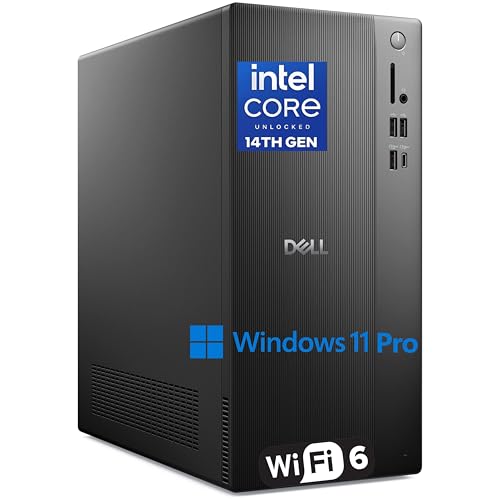
The Dell Ect1250 hands you the most memory and storage in the group, 32GB DDR5 and a 1TB SSD, with Windows 11 Pro ready out of the box.
Best for: someone who wants headroom and Windows 11 Pro out of the box Skip it if: desk space is genuinely tight
This is the headroom pick. Its listed size of 32GB DDR5 RAM and a 1TB SSD is the largest pairing here, doubling the RAM and storage of most rivals. For a remote worker who keeps large files local or runs several heavy apps at once, that margin is the reason to choose it.
Dell lists an Intel Core i3-14100 processor (4-core, 3.5 to 4.7GHz), Intel UHD 730 graphics driving dual 4K displays over HDMI 2.1 and DisplayPort 1.4, and Wi-Fi 6 with Bluetooth. Windows 11 Pro is included, which the listing pitches for remote management and business security. The tower measures 11.5 x 12.8 x 6.06 in.
The catch is size and price. It's the most expensive pick here, and at nearly a foot tall it's the largest chassis in the set. Its warranty is listed at 1 year, well short of the Blackview's three. You're paying for capacity and a trusted name, not for compactness.
Pros:
- 32GB DDR5, the most RAM in this set
- 1TB SSD, the largest storage here
- Windows 11 Pro included per the listing
- Dual 4K output over HDMI 2.1 and DP 1.4
Cons:
- Most expensive pick here
- Largest chassis of the six at 11.5 in tall
- Only 1 year warranty listed
- Only one seller lists it
3. MINIX NGC N512 Mini PC — Runner-up
The MINIX N512 is the connectivity specialist, listing dual Ethernet alongside a four-screen display claim in a 1.04 lb chassis.

Best for: video calls that lean on wired networking Skip it if: you don't need dual Ethernet
The N512 earns runner-up on networking. MINIX lists dual Ethernet, one 2.5Gbps port and one 1Gbps, plus Wi-Fi 6 and Bluetooth 5.2. No other pick here advertises two wired ports. If your remote work depends on rock-solid video conferencing or you segment a network at home, that's a genuine differentiator.
It's also the lightest machine in the group at 1.04 lb, measuring 1.54 x 4.69 x 4.69 in. MINIX lists an Intel Core i5-12600H (12 cores, 16 threads), 16GB DDR5-4800 RAM and a 512GB M.2 PCIe 4.0 SSD. The display claim is aggressive: triple or quad 4K screens over Thunderbolt 4, dual HDMI and USB-C, with 8K output cited. Windows 11 Pro is preinstalled per the listing.
Against the Blackview, it loses on warranty: MINIX lists 1 year manufacturer coverage versus three. It also sits at the premium end of pricing. You're paying for the ports and the newer DDR5, not for long-term coverage.
Pros:
- Dual Ethernet, unique in this set
- Lightest pick at 1.04 lb
- 16GB DDR5 and a PCIe 4.0 SSD
- Quad-display and Thunderbolt 4 claims
Cons:
- Only 1 year warranty versus the Blackview's three
- Premium end of pricing here
- Only one seller lists it
4. Lenovo ThinkCentre M70q — Best for beginners
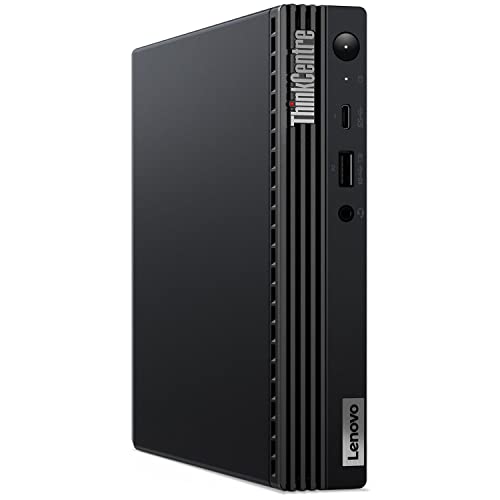
The Lenovo M70q is the easiest first home-office desktop: 16GB RAM, a 512GB SSD and preinstalled Windows 11 Pro in a compact 3 x 8 x 7 in body.
Best for: a first home-office machine that just works Skip it if: you need a published warranty
This is the pick for someone who wants a familiar name and no fuss. Lenovo lists an Intel i5-10500T, 16GB RAM and a 512GB SSD, with Windows 11 Pro preinstalled. The ThinkCentre line is a fixture in offices, so setup and support feel predictable even for a first-time desktop buyer.
The chassis measures 3 x 8 x 7 in, small enough to stand on a desk or lie flat behind a monitor. The listing pitches it as a space-saving business machine, which fits the remote-work brief. Its middle-of-the-road price position keeps it accessible without dropping to the bare-bones tier.
Two honest gaps. This is a renewed unit, and its specs list no warranty at all, so you'll want to confirm any coverage before buying. The i5-10500T is also the oldest Intel chip among the current-gen picks. For light-to-moderate work it's fine; for heavy media it's the weaker choice against the Dell or MINIX.
Pros:
- 16GB RAM and 512GB SSD
- Windows 11 Pro preinstalled per the listing
- Compact 3 x 8 x 7 in body
- Familiar ThinkCentre business platform
Cons:
- No warranty listed in the specs
- Renewed unit, not new
- Older i5-10500T processor
- Only one seller lists it
5. HP EliteDesk 800 G2 Mini — Best for pros
The HP EliteDesk 800 G2 Mini is the value workhorse: 16GB DDR4, a 512GB SSD and a bundled keyboard and mouse for a secondary or spare setup.

Best for: a spare or secondary workstation on a budget Skip it if: you want the newest silicon
The G2 Mini's appeal is what comes in the box. HP lists the computer, power cord, a USB keyboard, a USB mouse and a USB Wi-Fi adapter. That's a complete starter kit at the second-cheapest price in this set, which makes it a strong pick for a second desk or a spare machine that has to work on day one.
HP lists an Intel Core i5-6500T (up to 3.1GHz per the title), 16GB DDR4 RAM, a 512GB SSD, VGA and DisplayPort outputs, and Windows 10 Pro. It's a certified refurbished unit, which HP says is tested and cleaned to look and work like new.
The trade-offs are real. This is the oldest processor here, a 6th-gen i5, and it ships with Windows 10 Pro rather than 11. It's also the slowest seller of the six. Buy it for the bundled accessories and low entry cost, not for future-proofing. For a busy primary machine, the current-gen picks are the better call.
Pros:
- Keyboard, mouse and Wi-Fi adapter included
- 16GB DDR4 and 512GB SSD
- Second-cheapest pick here
- Certified refurbished per the listing
Cons:
- Oldest processor in the set, a 6th-gen i5
- Ships with Windows 10 Pro, not 11
- Sells slowest of the six
- Only one seller lists it
6. HP EliteDesk 800 G3 SFF — Best budget pick
The HP EliteDesk 800 G3 SFF is the cheapest way into a compact desktop, built around an Intel i7 with a fast front USB-C port.

Best for: the lowest entry price into a compact desktop Skip it if: you edit media or run heavy multitasking
This is the entry point. It's the cheapest of the six, and HP lists an Intel Core i7 (up to 3.8GHz Turbo) as the headline. For a browser, email and office documents, an i7 with an SSD feels quick, and the front fast-charging USB-C port is a nice touch at this price.
HP lists 8GB DDR4 RAM, a 256GB SSD, multiple USB 3.1 ports, dual DisplayPort outputs, an included Wi-Fi and Bluetooth adapter and Gigabit Ethernet. Windows 11 Pro comes preinstalled and activated per the listing.
The catch is the memory and storage. At 8GB RAM and 256GB, this is the smallest pairing in the set, half the RAM of every other pick. For a heavy multitasker or anyone working with large files, that ceiling arrives fast. The warranty is listed at 90 days, the shortest here, and it's a renewed unit. Choose it as a low-cost, light-duty machine, and step up if your workload is demanding.
Pros:
- Cheapest pick in the set
- Intel i7 processor per the listing
- Front fast-charging USB-C port
- Windows 11 Pro preinstalled
Cons:
- 8GB RAM, the least here
- 256GB SSD, the smallest storage
- 90-day warranty, the shortest listed
- Renewed unit, not new
Does small form factor matter for remote work?
Small form factor matters for remote work more than the spec race suggests, but only up to a point. Amazon's search for this category returns both palm-sized minis and compact towers, so "small" here is a range, not a fixed size. Judge it against your actual desk.
Here's the honest read. A remote worker mostly needs a machine that disappears behind a monitor, stays quiet on calls, and drives the screens you use. All six picks clear that bar in different ways.
- Truly tiny: the Blackview MP100 (1.7 x 5 x 5 in) and MINIX N512 (1.04 lb) hide anywhere.
- Compact but a box: the Lenovo M70q at 3 x 8 x 7 in stands on a desk.
- Small towers: the Dell Ect1250 and the HP SFF units are the largest, though still office-friendly.
So the modifier is worth checking yourself rather than trusting a title. If your desk is genuinely cramped, the two minis win. If you have room and want headroom, a small tower earns its space.
New versus renewed: which should you buy?
Three of these six are renewed or refurbished units, and that changes the calculus. It's the single detail I'd verify before checkout.
New machines here are the Blackview MP100, the Dell Ect1250 and the MINIX N512. Each lists a manufacturer warranty, and the Blackview's 3-year term is the standout. Renewed machines are the two HP EliteDesks and the Lenovo M70q.
Renewed isn't automatically a downgrade. HP says its G2 Mini is tested and certified to look and work like new, and refurbished business desktops are often built to last. The catch is coverage: the G3 SFF lists 90 days, and the Lenovo lists none at all. A short window means you carry more risk.
My rule of thumb:
- Want the longest safety net? Buy new, and the Blackview leads.
- Want the lowest cost and accept some risk? The renewed HP picks make sense.
- Want a known platform at a middle price? The renewed Lenovo fits, if you confirm coverage first.
When a different pick wins
The Blackview is my default, but four conditions flip it cleanly.
- You keep large files local or run heavy apps. The Dell Ect1250's 32GB DDR5 and 1TB SSD are double most rivals. It wins on headroom.
- Your calls depend on wired networking. The MINIX N512 is the only pick with dual Ethernet. Pick it for reliability on the wire.
- You want the lowest possible entry price. The HP EliteDesk 800 G3 SFF is the cheapest of the six. It wins on cost alone.
- You want a plug-and-play kit. The HP G2 Mini bundles a keyboard, mouse and Wi-Fi adapter. It wins for a spare desk that must work immediately.
Notice the threshold on RAM. Below 16GB, heavy multitasking stutters, which is why the 8GB G3 SFF is a light-duty pick and not a primary. At or above 16GB, all five other picks are viable, and the tiebreakers become warranty, ports and size.
The verdict
Two tracks decide this. If you want the safest all-round home-office machine, the Blackview MP100 is the pick: 16GB DDR4, a 512GB SSD, a triple-display claim and a 3-year warranty in a box under two inches tall. That warranty is its clean win, since no other pick here matches it. If you want maximum headroom instead, the Dell Ect1250 is the answer, with 32GB DDR5 and a 1TB SSD, double the memory and storage of most of the field, plus Windows 11 Pro out of the box.
The cutoff between them is workload. If your day is email, calls, spreadsheets and a heavy browser, the Blackview's specs are plenty and the long warranty tips it. If you keep large files local or run several demanding apps at once, the Dell's extra RAM and storage earn their higher price and larger footprint.
The MINIX N512 is the specialist runner-up for anyone whose calls lean on wired dual Ethernet. For a first machine, the Lenovo M70q is the friendly choice. For lowest cost, the two HP EliteDesks split the budget end.
FAQ
Is a small form factor desktop worth it for remote work?
A small form factor desktop is worth it for most remote workers who want a quiet, tidy setup that still drives multiple monitors. The Blackview MP100 fits in a 1.7 x 5 x 5 in box yet lists 16GB RAM and triple 4K output. You trade some upgrade room for the space saving, which is a fair deal at a home desk.
What is the best small form factor desktop computer for remote workers on a budget?
The best small form factor desktop computer for remote workers on a budget is the HP EliteDesk 800 G3 SFF, the cheapest of the six here. It lists an Intel i7 and a front USB-C port. The compromise is 8GB RAM and a 256GB SSD, the smallest pairing in this set, plus a 90-day warranty, so treat it as a light-duty pick.
How much RAM do I need in a compact desktop?
How much RAM you need depends on your workload, but 16GB is the comfortable floor for heavy multitasking, video calls and a busy browser. Five of the six picks here hit 16GB. The Dell Ect1250 goes further with 32GB DDR5 for large local files or several demanding apps. Only the 8GB HP G3 SFF sits below the line.
Blackview MP100 or Dell Ect1250: which should I pick?
Blackview MP100 or Dell Ect1250 comes down to warranty against headroom. The Blackview lists a 3-year warranty and a tiny 1.7 x 5 x 5 in body, ideal for a tight desk. The Dell counters with 32GB DDR5, a 1TB SSD and Windows 11 Pro, but a 1-year warranty and a larger tower. Choose the Blackview for peace of mind, the Dell for capacity.
What is the biggest mistake buying a compact desktop?
The biggest mistake buying a compact desktop is ignoring the warranty and renewed status. Three of these six are refurbished, and coverage ranges from a 3-year term to no listed warranty at all. Confirm the coverage and condition before checkout. A slightly larger warranty gap can cost far more than the price difference between two similar picks.
Start by matching a pick to how you actually work. If your desk is tight and you want the longest safety net, the Blackview MP100 is the sensible default: 16GB RAM, a 512GB SSD, a triple-monitor claim and 3-year coverage in a box smaller than a paperback. It's the one pick here that pairs current-gen specs with a warranty you can plan around, and that combination is what a remote worker really wants from a machine that has to run all day, every day. Confirm the current details on the listing, then buy with confidence.