Best Portable Mini PC for Graphic Designers by Spec
Six pocket-sized Windows desktops compared on the specs that decide design work: memory, storage, display output and portability. The DreamQuest Mini Plus takes the top spot.

By Lamar CalhounUpdated 14 min read
On this page
- What actually decides a design mini PC?
- Best portable mini pc for graphic designers at a glance
- How I screened these six down
- 1. DreamQuest Mini Plus Mini PC Windows 11 Pro Preloaded — Best overall
- 2. ACEMAGIC K1 Gaming Mini PC Ryzen 7 7730U — Best premium
- 3. ACEMAGIC Mini PC Windows 11 Pro AMD Ryzen 7330U — Best for quiet operation
- 4. KAMRUI P1 Mini PC — Best upgrade
- 5. KOOTIGERS Mini PC N150 — Best warranty
- 6. Bmax Mini PC B1 Plus — Best budget pick
- Do these mini PCs really suit graphic design?
- Memory and storage, ranked across the six
- When a different pick wins
- The verdict
- FAQ
The best portable mini PC for graphic designers is the DreamQuest Mini Plus, thanks to 12GB of DDR5 memory, a 512GB SSD and two full-function USB-C ports in a palm-sized box. If you want more graphics muscle for layered files, the ACEMAGIC K1 with Radeon 680M is the stronger buy. Every pick here outputs 4K at 60Hz, so the deciding factors are memory, storage and how you plan to carry the machine between desks.
What actually decides a design mini PC?
Most guides for the best portable mini pc for graphic designers lead with the processor name. That is not what decides it. None of these six carries a discrete graphics card, so raw CPU clock speed matters less than the three things that stall a design workflow: memory, storage headroom and display output.
Here is the order I'd check specs in:
- Memory. Layered files and multiple open apps eat RAM first. 16GB beats 12GB beats 6GB, plainly.
- Storage type and size. An SSD loads assets faster than eMMC, and 512GB holds more working files than 256GB.
- Display output. Every pick here does 4K at 60Hz. Some drive triple monitors, which matters for a reference-plus-canvas setup.
- Portability. Weight and footprint decide whether it travels or lives on one desk.
The obvious specification, the processor, is the last thing I'd argue about here. These are integrated-graphics machines aimed at layout, web design and photo work, not 3D rendering. A designer who reads the memory and storage columns first will pick better than one who chases gigahertz.
Best portable mini pc for graphic designers at a glance
| Pick | Memory & storage | Display output | Price |
|---|---|---|---|
Best overall DreamQuest Mini Plus |
12GB DDR5 512GB SSD |
4K 60Hz, dual HDMI | Check Price |
Best premium ACEMAGIC K1 |
16GB LPDDR4X 512GB SSD |
Triple 4K claim | Check Price |
Best for quiet operation ACEMAGIC Mini PC V1 |
16GB DDR4 256GB SSD |
4K claim | Check Price |
Best upgrade KAMRUI P1 |
16GB DDR4 256GB SSD to 4TB |
Triple 4K claim | Check Price |
Best warranty KOOTIGERS Mini PC N150 |
12GB DDR5 512GB SSD |
4K 60Hz dual | Check Price |
Best budget pick Bmax B1 Plus |
6GB LPDDR3 128GB eMMC |
4K 60Hz dual HDMI | Check Price |




How I screened these six down
I lined up the published specifications for every pick and compared them column by column. My approach was disqualification first: cut the machines that fail the design brief, then rank what survives.
Three cuts shaped this list:
- Too little memory to disqualify a top spot. The Bmax B1 Plus lists 6GB LPDDR3, which is why it lands as the budget entry, not the winner. Design apps want more headroom.
- Storage type over size. eMMC storage loads assets slower than an M.2 SSD. That kept the Bmax off any performance tier despite its low price position as the cheapest of the six.
- Unverifiable graphics claims. Several listings promise "triple 4K" output. I treated those as manufacturer claims, not measured performance, and ranked on the concrete numbers instead.
What survived splits neatly. The DreamQuest Mini Plus pairs 12GB of DDR5 with a 512GB SSD, the most modern memory in the set at its capacity. The two ACEMAGIC machines and the KAMRUI bring 16GB, but on older DDR4 or LPDDR4X. That memory-versus-generation trade-off is the real story of this comparison, and it decides the ranking below.
1. DreamQuest Mini Plus Mini PC Windows 11 Pro Preloaded — Best overall
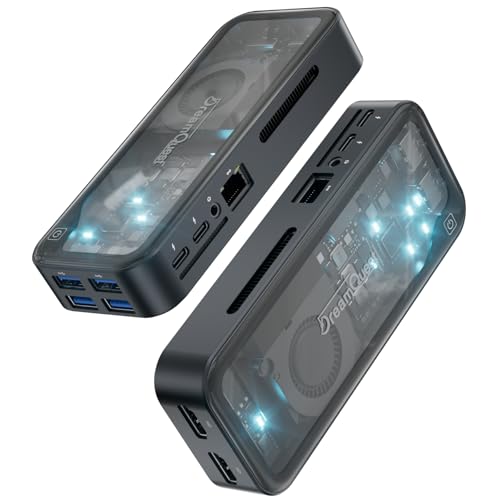
The DreamQuest Mini Plus wins because it pairs current DDR5 memory with a full 512GB SSD and two working USB-C ports, the most balanced spec sheet here.
Best for: designers wanting DDR5 memory and dual USB-C in a compact box Skip it if: you need dedicated graphics horsepower
What sets this one apart in the group is memory generation. It carries 12GB of DDR5, while the higher-capacity picks fall back on DDR4 or LPDDR4X. DreamQuest says the Intel N95 runs up to 3.4GHz and claims a 78% GPU lift over the older N100 family. Treat that as the maker's figure, not a lab result. The 512GB SSD matches the largest storage in the set, so your working files and app library get real room.
The connectivity is the practical draw for a designer. Two full-function USB-C ports handle video out, data and charging, alongside two HDMI and four USB 3.2 ports. That is enough to run a monitor, a drawing tablet and an external drive at once. WiFi 6 and Bluetooth 5.3 round it out. It sells briskly here, second only to the quiet ACEMAGIC by demand.
The trade-off is memory quantity. At 12GB it holds less than the 16GB picks, and like every machine here it leans on integrated graphics.
Pros:
- 12GB DDR5, the most current memory here
- 512GB SSD ties for largest storage
- Two full-function USB-C ports
- Dual HDMI plus four USB 3.2 ports
- 1-year warranty stated
Cons:
- 12GB is less RAM than the 16GB picks
- Integrated graphics only, no discrete GPU
- Size and weight not published
- N95 is an entry-tier processor
2. ACEMAGIC K1 Gaming Mini PC Ryzen 7 7730U — Best premium
The ACEMAGIC K1 earns the premium slot on its Ryzen 7 processor and Radeon 680M graphics, the most capable integrated pairing in the set.

Best for: heavier multitasking with Radeon 680M graphics Skip it if: you want the smallest possible footprint
This is the muscle pick. ACEMAGICIAN says the Ryzen 7 7730U runs eight cores and sixteen threads up to 4.5GHz, with Radeon 680M graphics driving the visuals. For a designer juggling several large files, that thread count is the strongest case here for smooth multitasking. It carries 16GB LPDDR4X memory and a 512GB M.2 SSD, matching the DreamQuest on storage while adding memory.
The listing claims triple 4K display output through HDMI, DisplayPort and Type-C. I'd treat the triple-monitor promise as a manufacturer claim, though the mix of ports is genuinely useful for a multi-screen layout desk. The chassis measures 5.19 x 5.19 x 1.96 inches, so it is the chunkiest body among the picks that publish dimensions.
Why not number one? Its price position is the second-highest here, and its memory is LPDDR4X rather than the DreamQuest's DDR5. You pay more for the stronger processor and lose a memory generation. That is a fair trade for heavy work, less so for light layout.
Pros:
- Ryzen 7, 8 cores and 16 threads claimed
- Radeon 680M, strongest integrated graphics here
- 16GB memory plus 512GB SSD
- Three video outputs including DisplayPort
Cons:
- Bulkiest published footprint at 1.96 in thick
- Second-highest price position in the set
- Memory is LPDDR4X, not DDR5
- No stated warranty in the listing
3. ACEMAGIC Mini PC Windows 11 Pro AMD Ryzen 7330U — Best for quiet operation
The ACEMAGIC V1 is the pick when weight matters, at just 1.1 lb with a cooling system the maker builds its pitch around.

Best for: a light second machine at 1.1 lb Skip it if: you need more than 256GB of storage
At 1.1 lb, this is the lightest machine with a published weight, and its 1.61 x 5.04 x 5.04 inch body slides into a bag easily. ACEMAGIC pitches it as a second PC and highlights a high-efficiency cooling system in the silver chassis. For a designer who moves between a studio and home, that portability plus 16GB of DDR4 memory is a sensible pairing.
It is also the one buyers reach for most often across this set. The Ryzen 7330U brings four cores and eight threads, which the maker positions above the N150 class. That is plenty for layout, web work and photo edits, if not for the heaviest layered files.
The catch is storage. It ships with a 256GB SSD, half the DreamQuest's capacity, which fills fast if you keep asset libraries local. Connectivity is also a step back, with WiFi 5 and Bluetooth 4.2 where the DreamQuest offers WiFi 6. The trade-off is clear: you gain portability and 16GB of RAM, you give up storage room and the newer wireless.
Pros:
- Lightest published weight at 1.1 lb
- 16GB DDR4 memory
- Compact 5.04 in square footprint
- Cooling system emphasised by the maker
Cons:
- 256GB SSD, half the top picks
- WiFi 5 and Bluetooth 4.2 only
- No stated warranty in the listing
- No discrete graphics
4. KAMRUI P1 Mini PC — Best upgrade
The KAMRUI P1 is the pick for someone who wants to grow into the machine, with storage the maker says expands to 4TB.

Best for: triple 4K displays and storage you plan to expand Skip it if: you want it out of the box at full capacity
The upgrade path is the reason to look here. KAMRUI says the Ryzen R2544 runs up to 3.7GHz at a 28W TDP, paired with 16GB DDR4 memory and a 256GB M.2 SSD that expands to 4TB. If you start light and expect your asset libraries to grow, that headroom is worth more than a bigger SSD you never fill.
The listing also claims triple 4K display output via AMD Radeon graphics, which suits a reference-plus-canvas-plus-preview desk. I read the triple-display line as a manufacturer claim. The body weighs 1.34 lb and measures 2.01 x 5.05 x 5.05 inches, so it is close to the ACEMAGIC V1 in footprint but a shade thicker.
Its price sits in the upper half of the set, and it sells more slowly than the ACEMAGIC pair. The honest weakness is that 256GB out of the box: you buy this for what it can become, not what it ships as. Budget for a drive if you fill storage quickly.
Pros:
- Storage expandable to 4TB, per the maker
- 16GB DDR4 memory
- Triple 4K output claimed
- Gigabit Ethernet plus dual-band WiFi
Cons:
- Ships with only 256GB
- Slower seller than the ACEMAGIC picks
- Upper-half price position
- Integrated graphics only
5. KOOTIGERS Mini PC N150 — Best warranty
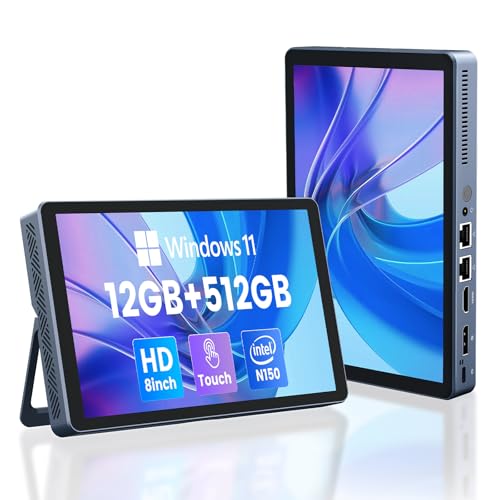
The KOOTIGERS N150 stands out for its built-in LCD screen and dual Gigabit Ethernet, an unusual mix for a mini desktop.
Best for: a built-in LCD screen and dual Ethernet Skip it if: portability is your first priority
This is the oddball of the group, and I mean that kindly. It carries a small LCD screen on the chassis, which none of the others offer, plus dual 1000M Ethernet for a wired studio setup. Under the hood it matches the DreamQuest on paper: an Intel N150 up to 3.6GHz, 12GB DDR5 memory and a 512GB SSD. WiFi 6 and Bluetooth 5.2 handle wireless duty.
For a designer with a fixed desk who wants at-a-glance status and reliable wired networking, that combination is genuinely useful. The stated 1-year warranty is why it holds this label in the set.
The problem is the shape. At 2.69 lb and 4.8 x 7.6 x 0.9 inches, it is the heaviest pick here and the largest by area, so "portable" stretches. It is also the slowest seller of the six by a wide margin. The trade-off: you gain a screen and dual Ethernet, you lose the pocket-sized portability that defines the category.
Pros:
- Built-in LCD screen, unique here
- 12GB DDR5 and 512GB SSD
- Dual 1000M Ethernet ports
- WiFi 6 and Bluetooth 5.2
Cons:
- Heaviest at 2.69 lb
- Largest footprint of the six
- Slowest seller of the set
- Entry-tier N150 processor
6. Bmax Mini PC B1 Plus — Best budget pick
The Bmax B1 Plus is the cheapest and lightest way into the category, at a listed 0.49 lb, but its specs mark it as a light-duty machine.

Best for: the lightest, cheapest entry into the category Skip it if: you edit large files or run heavy apps
This is the entry ticket. As the cheapest of the six, it strips the spec sheet to essentials: an Intel Celeron J3355 up to 2.5GHz, 6GB LPDDR3 memory and 128GB eMMC storage. Bmax lists it at 1.42 x 4.25 x 4.13 inches and 0.49 lb, the smallest and lightest body here. It still drives dual HDMI at 4K 60Hz and supports M.2 SSD expansion to 2TB.
For light layout, browser-based design tools or a travel machine you won't push hard, that is a workable package. Dual-band WiFi, Bluetooth 5.0 and Gigabit Ethernet cover connectivity, and a 1-year warranty is stated.
Be honest about the ceiling. 6GB of LPDDR3 is the least memory in the set, and eMMC loads assets more slowly than the SSDs above it. Serious design work will feel it. The trade-off is stark: you get the lowest price and smallest size, and you give up the memory and storage speed that every heavier pick brings. Buy it for its limits, not despite them.
Pros:
- Cheapest of the six
- Lightest listed weight at 0.49 lb
- Dual HDMI 4K 60Hz output
- SSD expansion up to 2TB
Cons:
- Only 6GB LPDDR3 memory
- 128GB eMMC, slower than SSD
- Celeron J3355 is the weakest chip here
- Not suited to heavy design apps
Do these mini PCs really suit graphic design?
Here is the straight answer. Amazon's search for a design-specific machine surfaced general-purpose mini desktops, and none of these six carries a discrete graphics card. So no pick here is built around graphics acceleration, and I won't pretend otherwise.
What that means in practice:
- Good fit: page layout, web and UI design, photo retouching, browser-based tools, and running the Windows 11 Pro creative apps most designers use daily.
- Poor fit: heavy 3D rendering, large-scale video editing or GPU-accelerated effects, where integrated graphics will stall.
The ACEMAGIC K1's Radeon 680M is the closest thing to a graphics advantage in the group, which is why it takes the premium slot. If your work is layout and image editing, memory and storage matter more than the GPU, and the DreamQuest's DDR5 and 512GB SSD serve you well. Judge each listing's memory and storage against your file sizes before you buy, because the category label promises more graphics capability than these machines deliver.
Memory and storage, ranked across the six
Memory and storage decide more of the design experience than any other spec here, so it's worth seeing them side by side. Ranked by memory, then storage:
- ACEMAGIC K1 — 16GB LPDDR4X, 512GB SSD. The best combined figure in the set.
- ACEMAGIC V1 — 16GB DDR4, 256GB SSD. Same memory, half the storage.
- KAMRUI P1 — 16GB DDR4, 256GB SSD expandable to 4TB. Grows the furthest.
- DreamQuest Mini Plus — 12GB DDR5, 512GB SSD. Less memory, but the newest generation.
- KOOTIGERS N150 — 12GB DDR5, 512GB SSD. Matches the DreamQuest on paper.
- Bmax B1 Plus — 6GB LPDDR3, 128GB eMMC. The floor on both.
The tension is real: the three 16GB machines run older DDR4 or LPDDR4X, while the two 12GB machines run current DDR5. For most design tasks, more RAM helps more than a newer memory generation, which is why the K1 tops this table. The DreamQuest still wins overall on balance, because its 512GB SSD and dual USB-C outweigh the K1's bulk and price for a portable pick.
When a different pick wins
The DreamQuest is my default, but the right machine flips on a few concrete conditions. If any of these describes you, follow the arrow.
- If you run several large files at once, the ACEMAGIC K1 wins. Its Ryzen 7 with 16 threads and Radeon 680M handles multitasking that a 12GB N95 will strain against.
- If your bag weight matters most, the Bmax B1 Plus at 0.49 lb or the ACEMAGIC V1 at 1.1 lb beat the rest. The DreamQuest doesn't publish a weight, and the KOOTIGERS is the heaviest at 2.69 lb.
- If you expect your storage needs to grow, the KAMRUI P1 wins on its 4TB expansion ceiling.
The cutoff for memory is simple. If your typical project keeps more than a handful of heavy files and apps open, aim for a 16GB pick. Below that load, the DreamQuest's 12GB DDR5 and 512GB SSD are the better-balanced buy for the best portable mini pc for graphic designers.
The verdict
If you want one machine to trust, buy the DreamQuest Mini Plus. Its 12GB of DDR5 memory, 512GB SSD, dual USB-C ports and WiFi 6 give a designer the most balanced spec sheet here, and it sells briskly for good reason. It handles layout, web design and photo work without complaint, and its connectivity runs a monitor, tablet and drive at once.
The runner-up is the ACEMAGIC K1, and its advantage is specific: a Ryzen 7 processor with 16 threads and Radeon 680M graphics, the strongest integrated pairing in the group. If your work leans on heavy multitasking or larger files, that muscle is worth the higher price position and the bulkier 1.96-inch-thick body.
The cutoff between them is your workload. Light-to-medium design work, where memory generation and storage size matter more than raw threads, points to the DreamQuest. Heavy multitasking, where thread count and graphics matter most, points to the K1. Everyone chasing the lowest price should look hard at the Bmax B1 Plus first, provided its 6GB of memory suits the light tasks it's built for.
FAQ
Is a mini PC worth it for graphic design work?
A mini PC is worth it for design work that stays within layout, web design and photo editing. These six run Windows 11 Pro and drive 4K displays, which covers most creative apps. What they lack is discrete graphics, so heavy 3D or video rendering will strain them. Match the machine's memory and storage to your file sizes before deciding.
Which offers the best value for the money here?
The best value for the money depends on your load. The Bmax B1 Plus is the cheapest of the six and the lightest at 0.49 lb, ideal for light tasks. But the DreamQuest Mini Plus gives you 12GB DDR5 and a 512GB SSD for an entry-tier price position, which is more machine per outlay for real design work.
How much memory and storage do these mini PCs have?
Memory and storage vary widely across these picks. Three machines carry 16GB, the ACEMAGIC K1, ACEMAGIC V1 and KAMRUI P1. The DreamQuest and KOOTIGERS carry 12GB of newer DDR5. The Bmax has 6GB. Storage runs from 128GB eMMC on the Bmax up to 512GB SSD on the DreamQuest, K1 and KOOTIGERS. The KAMRUI expands to 4TB.
DreamQuest Mini Plus or ACEMAGIC K1 for heavy files?
For heavy files, the DreamQuest Mini Plus and ACEMAGIC K1 split by workload. The K1 wins with its Ryzen 7 processor, 16 threads and Radeon 680M graphics, built for multitasking many large files. The DreamQuest counters with newer 12GB DDR5 memory and a smaller footprint. Choose the K1 for load, the DreamQuest for balance and portability.
What pitfall should I avoid when buying one?
The pitfall to avoid is assuming any mini PC here handles GPU-heavy work. None carries a discrete graphics card, so 3D rendering and large video projects will stall. A second trap is buying on capacity alone: a 16GB machine with slow eMMC storage can feel slower than a 12GB machine with an SSD. Read the storage type, not just the size.
Start by matching your file sizes to a memory figure: heavy, layered projects want a 16GB pick, lighter layout work runs fine on 12GB. From there, the DreamQuest Mini Plus is the safe default, because its DDR5 memory, 512GB SSD and dual USB-C ports cover the daily reality of design without overpaying for threads you won't use. Open its listing alongside the ACEMAGIC K1's, compare the two spec sheets against your own workload, and you'll know which of the two belongs on your desk.