Best High Performance Mini PC for a Home Office
Six compact desktops, ranked by what their published specs actually deliver. The HP EliteDesk 800 G5 with a Core i7-9700T and 32GB of DDR4 takes the top spot, but three named conditions flip that pick.

By Lamar CalhounUpdated 17 min read
On this page
- Best high performance mini PC at a glance
- Which buyer does each of these six mini PCs fit?
- Renewed enterprise or new budget brand: which risk do you prefer?
- 1. HP EliteDesk 800 G5 High-Performance Mini PC Desktop — Best overall
- 2. BOSGAME P6 Neo Mini Gaming PC — Best premium
- 3. GMKtec M5S Gaming PC Mini Desktop Computer — Best for families
- What actually decides a high performance mini PC purchase
- 4. DreamQuest Mini PC Windows 11 Pro AMD Ryzen 5300U 16GB RAM — Best warranty
- How many monitors can each one drive?
- 5. GenMachine Mini PC AMD Ryzen 5 4500U — Most versatile
- 6. HP EliteDesk 800 G5 Mini Computer Desktop PC — Best budget pick
- What the listings leave out
- The verdict
- FAQ
The best high performance mini PC here is the HP EliteDesk 800 G5 in its 32GB configuration, because it pairs an eight-core Core i7-9700T with 32GB of DDR4 and a 1TB SSD in a box that hides behind a monitor. If you want integrated graphics that can actually push frames, the BOSGAME P6 Neo with its Ryzen 7 6800H and 24GB of DDR5 is the better buy. This category is not for everyone, though. If you want to upgrade a graphics card in two years, or you already own a tower with room to grow, stop reading and buy a tower. Small cases trade expansion for desk space, permanently.
Best high performance mini PC at a glance
| Pick | Processor | RAM + storage | Price |
|---|---|---|---|
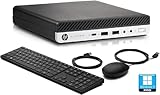
| Core i7-9700T 8 cores, 8 threads |
32GB DDR4 1TB SSD |
Check Price | |
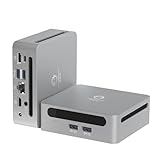
Best premium BOSGAME P6 Neo Mini Gaming PC |
Ryzen 7 6800H 8 cores, 16 threads |
24GB DDR5 1TB PCIe 4.0 SSD |
Check Price |
Best for families GMKtec M5S Gaming PC Mini Desktop Computer |
Ryzen 3 5400U 2.6GHz base claim |
16GB DDR4 512GB SSD |
Check Price |
Best warranty DreamQuest Mini PC Windows 11 Pro |
Ryzen 5300U 4 cores, 8 threads |
16GB DDR4 512GB NVMe SSD |
Check Price |
Most versatile GenMachine Mini PC AMD Ryzen 5 4500U |
Ryzen 5 4500U 6 cores |
16GB DDR4 512GB SSD |
Check Price |
Best budget pick HP EliteDesk 800 G5 Mini Computer Desktop PC |
Core i7-9700 8 cores |
8GB 256GB NVMe SSD |
Check Price |



Which buyer does each of these six mini PCs fit?
I screened these six by matching published hardware to the job the machine has to do, because a mini PC that suits a spreadsheet desk is the wrong machine for a media room. Four buyer profiles cover almost everyone shopping this category.
- The heavy multitasker. Dozens of browser tabs, a video call, a large spreadsheet, all at once. RAM is the binding constraint here, not clock speed. That is the 32GB HP EliteDesk.
- The light gamer or creator. Wants integrated graphics that render something more demanding than a browser. That is the BOSGAME P6 Neo, the only pick in this set built around RDNA 2 graphics.
- The shared-desk household. Homework, streaming, a bit of photo editing. Size and quiet matter more than benchmark scores. The GMKtec M5S at 1.1 lb wins that one.
- The cautious first-timer. Wants a machine that works and cover if it doesn't. The DreamQuest with a one-year warranty, at the second-cheapest position here, fits.
Notice what none of these profiles is: a person who wants one machine to do everything at maximum. No mini PC in this set does that. Each of the six is a set of compromises with a shape, and the shape either matches your desk or it doesn't. Pick the profile first. The hardware follows.
Renewed enterprise or new budget brand: which risk do you prefer?
This is the real fork in this set, and it barely gets mentioned in most best high performance mini PC comparisons. Two of the six are renewed HP EliteDesk business machines. Four are new units from smaller brands.
Renewed enterprise hardware gets you build quality that was engineered for a corporate refresh cycle, plus a Core i7 that was expensive when new. Both HP picks list a 90-day warranty. That is the shortest cover in this set by a wide margin.
The new units from BOSGAME, GMKtec, GenMachine and DreamQuest all list a full year, and BOSGAME states three years on parts. Newer silicon too: DDR5 memory, Wi-Fi 6E, USB4. What you give up is a decade of chassis engineering and, in some cases, published dimensions.
Neither answer is wrong. The question is which failure you would rather absorb. A renewed unit that dies in month five leaves you with no manufacturer cover. A budget-brand unit that dies in month five gets replaced.
- Choose renewed if you value core count and RAM per dollar above cover.
- Choose new if a dead machine in month eight would be a genuine problem.
- Choose renewed if you already own spare drives and RAM.
- Choose new if this is your only computer.
1. HP EliteDesk 800 G5 High-Performance Mini PC Desktop — Best overall
Eight cores and 32GB of DDR4 in a box this small is the most usable specification combination in the set.

Best for: a home office running heavy multitasking on a Windows 11 Pro machine Skip it if: you need a long manufacturer warranty
Nothing else in this group ships with 32GB of RAM. The next closest is the BOSGAME P6 Neo at 24GB, and after that everything drops to 16GB or less. That gap is the whole argument. HP's listing describes the Core i7-9700T as a 9th-generation part with 8 cores and 8 threads. Storage is 1TB, matching the BOSGAME and doubling the two 512GB picks.
The port layout is where the renewed enterprise heritage shows. HP lists USB 3.0 ports, two DisplayPorts and a VGA port, plus a bundled keyboard and mouse. VGA is unusual in 2024 and genuinely useful if you're driving an older projector or a legacy monitor that nothing else in this set can reach.
Windows 11 Pro comes preinstalled, which matters if you need BitLocker or domain join. The catch is cover: 90 days, the shortest here, and only one seller lists it. This is the second-most expensive pick in the set for hardware that is a generation or two behind the BOSGAME on memory type and graphics. You're buying core count and RAM capacity, not novelty.
Pros:
- 32GB DDR4, the most memory in this set
- Eight-core Core i7-9700T per HP's listing
- 1TB SSD, tied for largest storage here
- Two DisplayPorts plus VGA for legacy screens
- Keyboard and mouse included
Cons:
- 90-day warranty, shortest in this comparison
- Renewed rather than new hardware
- DDR4 memory where the premium pick uses DDR5
- Only one seller lists it
- No published weight or dimensions
2. BOSGAME P6 Neo Mini Gaming PC — Best premium
The only pick in this set with graphics hardware built for frames rather than desktops.

Best for: light gaming and content creation on three displays Skip it if: you want the lowest price in this set
BOSGAME states the P6 Neo runs a Ryzen 7 6800H with 8 cores and 16 threads up to 4.7GHz, paired with Radeon 680M graphics on RDNA 2 architecture at 1900MHz. Sixteen threads is double the HP's eight, and threads are what video encoding and compilation consume. Memory is 24GB of dual-channel DDR5 at 4800MHz, listed as 12GB x2 and expandable to 64GB.
The connectivity list is the most modern here. BOSGAME claims triple display output through HDMI, DisplayPort and USB4, with 8K at 60Hz over USB4, plus Wi-Fi 6E, Bluetooth 5.2 and dual 2.5GbE LAN ports. The company also says the USB4 port supports PD 3.0 up to 100W, so a single cable can carry power. Storage is 1TB on PCIe 4.0x4.
Warranty is the strongest in the set: BOSGAME lists one year on the whole machine and three years on parts. At 2.65 lb it is the heaviest pick here, and the blue chassis released in 2024 is the most expensive of the six. Two sellers stock it. The trade-off against the HP is plain: fewer gigabytes of RAM, better graphics and newer memory.
Pros:
- Radeon 680M on RDNA 2, only such graphics here
- 8 cores and 16 threads per BOSGAME's listing
- 24GB DDR5 at 4800MHz, expandable to 64GB
- 1-year machine and 3-year parts warranty
- Dual 2.5GbE LAN and Wi-Fi 6E
Cons:
- The most expensive pick in this set
- 24GB of RAM against the HP's 32GB
- Heaviest at 2.65 lb
- Graphics performance claims are the manufacturer's
3. GMKtec M5S Gaming PC Mini Desktop Computer — Best for families
At 1.1 lb this is the machine that genuinely disappears behind a monitor.

Best for: a shared family desk where the PC has to disappear Skip it if: you need eight fast cores
Weight and dimensions are published here, which is more than three of the six manage. The M5S lists 1.1 lb and 2.7 x 10 x 2 in. That is under half the BOSGAME's 2.65 lb and the only pick in this set light enough to hang off a monitor arm without thought.
GMKtec describes the Ryzen 3 5400U as a 7nm part with a 2.6GHz guaranteed base clock and turbo above that, paired with Radeon graphics running 6 cores at 1600MHz. The listing is honest about scope: it calls the graphics suitable for lightweight and retro gaming, which is a fair description rather than a stretch. Memory is 16GB DDR4 in a single SO-DIMM slot, and GMKtec claims expansion to 128GB. Storage is 512GB on PCIe.
Networking is a strength: dual 2.5G RJ45 ports, and GMKtec claims triple 4K display support including 8K at 60Hz over USB4. Warranty is one year. Behind the HP EliteDesk, this is the pick buyers in this category choose second most often. The trade-off is raw capability. A Ryzen 3 with four cores is a meaningful step down from the eight-core picks, and that is the price of the small chassis.
Pros:
- 1.1 lb, lightest pick in this set
- Published dimensions of 2.7 x 10 x 2 in
- Dual 2.5G LAN ports
- 1-year limited warranty
- RAM expandable to 128GB per GMKtec
Cons:
- Ryzen 3 with fewer cores than the top two picks
- 512GB storage against 1TB on the leaders
- Single RAM slot limits dual-channel operation
- Listing itself limits gaming claims to retro and light titles
What actually decides a high performance mini PC purchase
Most guides to the best high performance mini PC line the processors up and declare a winner. That is the wrong first move. Every one of these six has a processor that will open a spreadsheet instantly. The specification that decides your experience is memory capacity, and after that, thermal headroom.
Here is why. A mini PC chassis has almost no room for airflow, so a chip that boosts to 4.7GHz on paper holds that clock for seconds, not minutes. Sustained work settles at a lower speed regardless of the number on the box. What does not throttle is RAM. If you have 32GB, you have 32GB at hour six of a workday.
That reorders this set. The HP at 32GB and the BOSGAME at 24GB sit clearly above the four 16GB-or-less machines for anything involving many open applications. The HP EliteDesk in its 8GB configuration is the cheapest pick here, and 8GB is where Windows 11 starts swapping to disk.
The second criterion is expansion. BOSGAME and DreamQuest both state expansion to 64GB, and GMKtec claims 128GB. That means a 16GB machine today can become a 32GB machine later for the cost of a memory stick. A machine with soldered memory cannot.
Ask three questions in this order:
- How many applications do you keep open at once?
- Can the RAM be upgraded, and to what ceiling?
- Do you need discrete-class graphics, or will integrated do?
4. DreamQuest Mini PC Windows 11 Pro AMD Ryzen 5300U 16GB RAM — Best warranty
A full year of cover at the second-cheapest position in this set is the clearest value here.

Best for: a first mini PC buyer who wants a year of cover for very little Skip it if: you want published dimensions before you buy
The warranty comparison in this set is stark. Both HP picks list 90 days. DreamQuest lists one year, and it does so at a price position below every pick except the 8GB HP. That is four times the cover of the machine leading this ranking, for less money.
DreamQuest describes the Ryzen 5300U as a 4-core, 8-thread processor. Eight threads matters more than four cores for responsiveness under load, and it puts this pick ahead of the GMKtec on paper for multitasking. Memory is 16GB DDR4 with stated expansion to 64GB, and storage is 512GB on NVMe. Weight is 2.2 lb in a space gray chassis.
The port set is generous for the price. DreamQuest claims triple 4K at 60Hz output through HDMI, DisplayPort and a full-function USB-C port, which matches the display capability of picks costing considerably more. Networking is dual 1000Mbps LAN with Wi-Fi 6 and Bluetooth 5.0, and the listing suggests soft router and NAS duty as a use case.
Where it falls short is the network speed and the missing information. Dual gigabit is half the throughput of the 2.5GbE ports on the BOSGAME and GMKtec, and no dimensions are published at all.
Pros:
- 1-year warranty at the second-cheapest position
- 4 cores and 8 threads per DreamQuest's listing
- 16GB DDR4 expandable to 64GB
- Triple 4K at 60Hz output claimed
- Wi-Fi 6 and Bluetooth 5.0
Cons:
- Gigabit LAN where two picks offer 2.5GbE
- No published dimensions
- 512GB storage, half the two leaders
- Only one seller lists it
How many monitors can each one drive?
Display output is where these six diverge most, and it is easy to miss because the marketing language blurs it. Three of the six claim triple-display support. One claims dual.
- BOSGAME P6 Neo: triple display via HDMI, DisplayPort and USB4, with 8K at 60Hz over USB4.
- GMKtec M5S: three simultaneous displays claimed, including 8K at 60Hz over USB4 and 4K at 60Hz over HDMI.
- DreamQuest: triple 4K at 60Hz through HDMI, DisplayPort and full-function USB-C.
- GenMachine: 4K HDMI with dual display support, the narrowest here.
- HP EliteDesk 32GB: two DisplayPorts plus VGA, with 4K support stated.
The practical reading: if you run three screens, the GenMachine is out. If you run two modern screens plus one older VGA panel, the HP is the only pick in this set that reaches all three without an adapter. And if you want one USB-C cable carrying video, data and power to a laptop-style dock, BOSGAME's USB4 with PD 3.0 up to 100W is the only listing here claiming that.
One caution. All of these are integrated graphics. Driving three 4K panels at 60Hz is achievable for desktop work and video, but the same GPU handling three high-resolution outputs will not also deliver smooth gameplay on one of them.
5. GenMachine Mini PC AMD Ryzen 5 4500U — Most versatile
A six-core chip in a 1.7 lb chassis built around being quiet rather than fast.

Best for: a quiet secondary machine for browsing and documents Skip it if: you plan to run three monitors
GenMachine leads its listing with quiet, compact and energy-efficient design rather than performance figures, and that framing is worth taking seriously. The Ryzen 5 4500U is a six-core mobile part, which sits between the four-core DreamQuest and the eight-core HP and BOSGAME. Memory is 16GB DDR4 and storage is 512GB SSD.
Weight is 1.7 lb, second-lightest here behind the GMKtec's 1.1 lb, and the chassis is black. Warranty is listed as one year. Wireless is Wi-Fi 6 and Bluetooth 5.2, the same Bluetooth generation as the BOSGAME and newer than the DreamQuest's 5.0.
The limitation to understand is display output. GenMachine claims 4K HDMI with dual display support, and dual is the ceiling. Every other pick in this set except the HP claims three. For a machine sitting beside a TV or serving as a second desk PC, two outputs is enough. For a three-monitor workstation, it disqualifies itself.
This is also the slowest-selling pick of the six by a wide margin, and it is listed under a broader category rather than alongside the others. Compared with the DreamQuest just below it in price, you gain two cores and lose a display output. That is the trade in one sentence.
Pros:
- Six-core Ryzen 5 4500U per GenMachine's listing
- 1.7 lb, second-lightest in this set
- 16GB DDR4 with 512GB SSD
- Wi-Fi 6 and Bluetooth 5.2
- 1-year warranty
Cons:
- Dual display only, narrowest output here
- Slowest seller of the six
- No published dimensions
- Only one seller lists it
- Listing states no wired network speed
6. HP EliteDesk 800 G5 Mini Computer Desktop PC — Best budget pick
Eight enterprise-grade cores at the lowest price here, with memory and storage that need upgrading.

Best for: the cheapest route into eight-core enterprise hardware Skip it if: 8GB of RAM and 256GB of storage sound tight
This is the same EliteDesk 800 G5 chassis as the winner, configured down. HP lists a Core i7-9700 with a frequency up to 4.7GHz, 8GB of RAM and a 256GB PCIe NVMe drive. It is the cheapest pick of the six, and the processor is the same class as the one in the machine at the top of this list.
The value case depends entirely on whether you'll upgrade. A memory stick and a larger NVMe drive turn this into something close to the winner for less than the winner costs. If you won't open the case, 8GB is thin for Windows 11 Pro and 256GB fills quickly once you install anything substantial.
The bundle is unusually complete: HP lists a USB keyboard and mouse, plus a USB Wi-Fi adapter and a USB Bluetooth adapter. That last detail is the tell. Wireless here is bolted on through USB ports rather than built in, unlike the Wi-Fi 6 and 6E radios in the newer picks. Ports listed are USB 3.0, USB 2.0, DisplayPort, line-in, line-out and RJ-45.
Warranty is a 90-day limited term, and this is the slowest seller of the two HP configurations. It is a project machine, not a finished one.
Pros:
- Cheapest pick in this set
- Core i7-9700 with 8 cores per HP's listing
- Windows 11 Pro preinstalled
- Keyboard, mouse and both USB adapters included
Cons:
- 8GB RAM, least in this comparison
- 256GB storage, smallest here
- Wi-Fi and Bluetooth via USB dongles, not built in
- 90-day limited warranty
- Renewed rather than new
What the listings leave out
Three of these six publish no dimensions at all, which is a strange gap in a category defined by size. The HP EliteDesk pair, the DreamQuest and the GenMachine all leave you guessing. Only the GMKtec states a footprint, at 2.7 x 10 x 2 in. Measure your shelf before you commit, and if the listing is silent, assume it will not fit the tightest gap you have.
Noise is the other blank. GenMachine calls its design quiet, which is a marketing word rather than a decibel figure. No listing here publishes a measured noise level, and no listing publishes a thermal design power number either. Both matter in a small chassis, and neither is available.
A few more things you will not learn from these pages:
- Whether the renewed HP units ship with a fresh SSD or the original drive
- How many RAM slots the HP configurations actually have free
- What VESA mounting hardware, if any, is included
- Whether the bundled keyboard and mouse are worth keeping
None of this means a listing is bad. It means the specification sheet ends earlier than your questions do, and the sensible response is to buy the pick with the longest warranty when two options otherwise look equal.
The verdict
Three tiers, three answers.
At the entry end, the cheapest HP EliteDesk 800 G5 gets you the same eight-core Core i7 chassis as the winner for the least money in this set, provided you accept 8GB of RAM, 256GB of storage and USB wireless dongles. Buy it only if you will add memory and a drive. Otherwise, the DreamQuest at the second-cheapest position is the better entry machine: 16GB, 512GB NVMe, four cores with eight threads, triple 4K output, and a one-year warranty against HP's 90 days.
In the middle sit the GMKtec M5S and the GenMachine. The GMKtec wins that pairing on published size, at 1.1 lb and 2.7 x 10 x 2 in, plus dual 2.5G LAN and triple display support. The GenMachine's six cores are the better chip, but its dual-display ceiling limits where it can go.
At the top, the 32GB HP EliteDesk is the pick for work. Nothing else here offers 32GB of DDR4 with a 1TB SSD. The BOSGAME P6 Neo takes the crown if graphics matter: Radeon 680M on RDNA 2, 16 threads, DDR5 at 4800MHz, and one year on the machine with three years on parts. The cutoff is simple. If your heaviest task is a browser with fifty tabs, take the HP. If it renders or plays, take the BOSGAME.
FAQ
Is a high performance mini PC worth it over a tower?
A high performance mini PC is worth it when desk space, noise and power draw matter more than upgrade paths. You get real capability, up to eight cores and 32GB in this set, in a box that mounts behind a monitor. What you sacrifice is graphics card expansion and easy cooling headroom. If you plan a GPU upgrade in two years, a tower is the honest answer.
Which of these gives the most performance for the money?
The most performance for the money in this set comes from the cheapest HP EliteDesk 800 G5, but only with a caveat. You get the same eight-core Core i7 chassis as the top pick at the lowest price here, then spend a little more on a RAM stick and a larger NVMe drive. Unopened, at 8GB, it is the weakest machine on this list.
How much RAM does a high performance mini PC actually need?
How much RAM you need depends on tab count and application count, not processor speed. For general work with many applications open, 16GB is the practical floor and the four mid-range picks here meet it. Heavy multitasking rewards 32GB, which only the top HP EliteDesk offers out of the box. Three of these picks state expansion to 64GB or more.
HP EliteDesk 800 G5 or BOSGAME P6 Neo: which should I buy?
Choose the HP EliteDesk 800 G5 if your work is memory-bound: 32GB of DDR4 and a 1TB SSD lead this set. Choose the BOSGAME P6 Neo if anything on screen needs rendering. It brings Radeon 680M graphics on RDNA 2, 16 threads, DDR5 at 4800MHz and a one-year machine warranty with three years on parts, against HP's 90 days.
What mistake do first-time mini PC buyers make most?
The mistake first-time mini PC buyers make most is trusting the boost clock on the box. A chip advertised at 4.7GHz holds that speed for seconds in a small chassis, then settles lower as heat builds. Memory capacity, storage size and display output count are the specifications that hold steady all day. Compare those first, clock speed last.
Start with the question of what your machine does at hour three of a workday, not what it does in the first thirty seconds. That single reframing puts the 32GB HP EliteDesk 800 G5 in front of the field, because RAM capacity does not fade under thermal load the way a boost clock does. Open the two Amazon listings for the HP and the BOSGAME side by side, look at the memory figures and the warranty terms together, and the decision resolves itself in under a minute. Then measure your shelf.