Best Budget Desktop Computer for Writers: Dell Wins
Six budget desktops compared for writers who need a quiet, reliable machine for drafting, research and revision. The Dell Optiplex 3060 leads, with clear runner-ups for tighter setups and bigger screens.

By Lamar CalhounUpdated 17 min read
On this page
- Who this guide is not for
- Best budget desktop computer for writers at a glance
- How I narrowed six listings down to a ranked set
- 1. Dell Optiplex 3060 Desktop Computer — Best overall
- 2. Dell Optiplex 7050 SFF — Best upgrade
- 3. HP OmniStudio 24 All-in-One — Best premium
- 4. Lenovo IdeaCentre 24 All-in-One — Best minimal setup
- 5. HP Business Tower Computer — Best budget pick
- 6. HVLANYN 23.8-Inch All-in-One — Best for pros
- What actually decides a writing desktop?
- Tower or all-in-one for a writing desk?
- New, renewed, or refurbished: what changes?
- What more money actually buys here
- The verdict
- FAQ
The best budget desktop computer for writers is the Dell Optiplex 3060, a renewed small tower with 32GB of RAM, a 1TB SSD and a 11.9 lb chassis that fits under most desks. If you want more cores for heavier work alongside your drafts, the Dell Optiplex 7050 SFF steps up to an Intel i7-7700 at 3.60GHz while keeping the same 32GB RAM and 1TB SSD.
Who this guide is not for
Writers cover a lot of ground, and a budget desktop cannot cover all of it. If you fall into one of these groups, save the money and go elsewhere.
- You write on the move. A desktop tethers you to a desk. A laptop or tablet is the right tool for cafe drafting, train journeys and residencies.
- You need a Mac for a specific app. Final Draft on macOS, or a Scrivener project synced across an iPhone and an iPad, is easier on Apple hardware. None of the picks here run macOS.
- You do heavy video work as your main job. These machines handle a writer's day. A colourist grading 4K footage needs a discrete GPU and more thermal headroom than any pick here.
- You want a warranty measured in years. Four of the six picks carry a 90-day or one-year warranty. If three-year cover matters, buy new from a mainstream retailer instead.
For everyone else, a budget desktop computer for writers is a sensible buy. A tower or all-in-one at this price gives you a bigger screen than a laptop, a real keyboard on a real desk, and enough RAM to keep a manuscript, a browser full of research, and a music app all open at once.
Best budget desktop computer for writers at a glance
| Pick | RAM & storage | Form factor | Price |
|---|---|---|---|
Best overall Dell Optiplex 3060 |
32GB RAM 1TB SSD |
Small tower, 11.9 lb | Check Price |
Best upgrade Dell Optiplex 7050 SFF |
32GB RAM 1TB SSD |
Small form factor tower | Check Price |
Best premium HP OmniStudio 24 |
16GB DDR5 128GB SSD |
24-inch all-in-one | Check Price |
Best minimal setup Lenovo IdeaCentre 24 |
16GB DDR4 512GB SSD |
24-inch all-in-one | Check Price |
Best budget pick HP Business Tower |
16GB DDR3 2TB HDD + 120GB SSD |
Full tower, 24.6 lb | Check Price |
Best for pros HVLANYN 23.8" AIO |
16GB RAM 512GB PCIe SSD |
23.8-inch all-in-one | Check Price |


How I narrowed six listings down to a ranked set
I started with the shortlist above and cut for reasons a writer would care about, in this order.
- Any pick that could not hold a real writing session in RAM was out. 16GB is the floor for browser-plus-Scrivener-plus-reference PDFs. Everything here meets it, and two picks double it.
- Anything without an SSD was out. Boot time and file-open time on a spinning drive breaks flow. Five of the six use SSDs as the boot drive. The exception, the HP Business Tower, adds a 120GB SSD alongside a 2TB HDD.
- Ports had to allow a second display or a printer. Every pick here lists HDMI, DisplayPort, or USB output. A writer who scrolls research on one screen and drafts on another benefits from that.
- I sorted the survivors by what a writer actually feels at the desk: RAM, drive speed, chassis size, and whether the machine ships with a keyboard, mouse or built-in display.
The Dell Optiplex 3060 came out on top because it pairs the largest RAM in the set with a full 1TB SSD, in a small chassis. The Optiplex 7050 SFF has the same RAM and SSD but a faster i7-7700 chip at 3.60GHz, which earns it the upgrade slot.
1. Dell Optiplex 3060 Desktop Computer — Best overall
A renewed small Dell tower with 32GB of RAM and a 1TB SSD, which is more headroom than most writers will use in five years.

Best for: a full-time writer who wants headroom for research tabs, Scrivener and a second drive of backups Skip it if: you need a bundled monitor and keyboard in the box
The Optiplex 3060 is the best budget desktop computer for writers in this set because it wins on the two figures that matter for writing work. 32GB of RAM is double what four of the other picks offer, so a browser with fifty tabs, a manuscript in Word, a PDF reader and a music app can all sit open at once without swap thrashing. The 1TB SSD holds decades of drafts and years of downloaded research at fast read speeds. The Intel i5-8500 is a six-core chip at 3.2GHz base, plenty for text work.
The chassis is small: 6 x 13.8 x 10.8 in and 11.9 lb, which means it can live on the desk or tuck onto a shelf under it. Dell lists built-in WiFi and Bluetooth, and the seller adds a side-panel RGB kit with 13 modes if that interests you. Windows 11 Professional is preinstalled. Against the all-in-ones here, the trade-off is obvious: you supply your own monitor, keyboard and mouse. Against the other tower, the Optiplex 7050 SFF, you give up the i7 chip and pay less to do it. Warranty is 90 days.
Pros:
- 32GB RAM, most in the set alongside the 7050
- 1TB SSD, tied for largest fast storage here
- Small 11.9 lb chassis fits under a desk
- Built-in WiFi and Bluetooth listed
- Sells faster than the rest of this set
Cons:
- No display, keyboard or mouse included
- 90-day warranty is short
- Renewed unit, so cosmetic condition varies
- RGB side-panel kit is irrelevant for writing work
2. Dell Optiplex 7050 SFF — Best upgrade
The same 32GB RAM and 1TB SSD as the winner, wrapped around an Intel i7-7700 chip at 3.60GHz for heavier side work.

Best for: a writer who edits video essays, records podcasts, or keeps very large project folders open Skip it if: your desk has no room to add a monitor and peripherals
The 7050 SFF is the upgrade to the winner, not a replacement for it. RAM and storage match: 32GB DDR4 and a 1TB SSD. The step up is the Intel Core i7-7700, a four-core chip that the listing rates at 3.60GHz. For a writer doing only prose, that extra clock speed does not translate into a felt difference. For a writer whose second job is a podcast, a YouTube channel, or long Zoom recordings that need trimming and exporting, it does.
The chassis is a small-form-factor design at 11.4 x 11.5 x 3.6 in, so it can sit flat on the desk or stand vertically beside a monitor. Dell says it supports dual monitors over HDMI, which is the setup most working writers eventually build: research on one screen, draft on the other. Windows 11 Pro comes preinstalled. Against the 3060, you pay a mid-tier price for the faster chip and the dual-monitor claim, and you keep the same short 90-day warranty. Against the all-in-ones, you keep the flexibility to swap monitors and keyboards as they wear out.
Pros:
- Intel i7-7700 at 3.60GHz, fastest chip in the set
- 32GB DDR4 RAM and 1TB SSD, tied top spec
- Dual-monitor support claimed on the listing
- Compact SFF chassis fits on or beside a desk
- Sells faster than any other pick here
Cons:
- 90-day warranty on a renewed unit
- No display, keyboard or mouse in the box
- Mid-range price for a chip generation from 2017
- Integrated graphics only, per the listing
3. HP OmniStudio 24 All-in-One — Best premium
A single white unit with a 24-inch Full HD display, DDR5 memory, and a pop-up privacy camera for video calls with editors.

Best for: a writer who wants one clean white unit on the desk with the display already attached Skip it if: you want to expand storage or RAM in a year or two
The OmniStudio 24 is the most expensive pick here, and it justifies the position with two things a writer feels every day: a large attached display and a tidy desk. HP describes a 24-inch Full HD IPS screen with ultra-thin bezels and a 90% screen-to-body ratio. The unit ships with a keyboard and mouse, so it is a one-box setup. 16GB of DDR5 memory is the newest RAM generation in this roundup. HP also lists a pop-up privacy camera and dual microphones with noise reduction, which matters for writers who take editorial calls or record occasional interviews.
The storage figure is the catch. HP lists a 128GB SSD, which is a quarter of what the mid-range HVLANYN offers and an eighth of what the two Dells hold. A working writer with a decade of research folders will fill 128GB inside a year. Plan for an external drive, or a cloud subscription, from day one. HP also lists EPEAT Gold and ENERGY STAR certifications for buyers who track that. Against the Lenovo IdeaCentre, you get newer DDR5 memory and lose 384GB of internal storage.
Pros:
- 24-inch Full HD IPS screen included
- Newest DDR5 memory in the set
- Pop-up privacy camera and dual mics
- Keyboard and mouse in the box
- One-year seller's warranty
Cons:
- 128GB SSD is the smallest here
- All-in-one design limits later upgrades
- The slowest seller of the six
- Most expensive pick in the set
4. Lenovo IdeaCentre 24 All-in-One — Best minimal setup
A 24-inch Full HD all-in-one with 16GB RAM, a 512GB SSD, and keyboard, mouse and lifetime Office access in the box.

Best for: a writer setting up a small home office from scratch with keyboard and mouse in the box Skip it if: you already own a good monitor you would rather keep using
The Lenovo IdeaCentre 24 is the pick to buy if you want to open one box and start writing. Lenovo lists a 23.8-inch Full HD display with 99% sRGB colour accuracy and anti-glare coating, which reduces eye fatigue during long drafting sessions. Inside, it has 16GB of DDR4 RAM and a 512GB SSD, which is a sensible middle ground for a writer with a few years of manuscripts, PDF research, and photo folders.
The unusual claim on this listing is lifetime Office 365 access, which Lenovo says is included with no subscription. If accurate, that removes a recurring cost that many writers pay every year for Word alone. Connectivity is well specified: WiFi 6, Bluetooth 5.1, HD webcam, dual microphones, USB 3.2 and 2.0, HDMI, Ethernet and an audio jack. Windows 11 Home is preinstalled. Against the HP OmniStudio, you save on the price position and get four times the SSD storage. Against the Dell towers, you give up half the RAM and lose the ability to open the case for cheap upgrades later.
Pros:
- 512GB SSD, four times the OmniStudio's storage
- 23.8-inch anti-glare display, easier on the eyes
- Keyboard, mouse and Office access included
- WiFi 6 and Bluetooth 5.1 listed
- Second-cheapest all-in-one here
Cons:
- 16GB RAM, half of what the Dells offer
- Sealed all-in-one limits later upgrades
- Warranty details are sparse on the listing
- Intel N100 chip is entry-level
5. HP Business Tower Computer — Best budget pick
The cheapest tower here, with 2TB of hard-drive space for a manuscript archive and a small SSD for the operating system.

Best for: a writer on the tightest budget who wants 2TB of manuscript archive space Skip it if: you care about boot speed on every application, not just the OS
This HP tower is the cheapest of the six and the only pick with 2TB of storage. HP splits the drives: a 120GB SSD holds the operating system and your active applications, and a 2TB spinning hard drive holds everything else. For a writer who saves years of drafts, scanned notebooks, and downloaded research, 2TB is a room-to-grow figure the other picks cannot match. RAM is 16GB DDR3, an older memory generation. The chip is an Intel Core i5-4570 quad-core up to 3.6GHz.
The chassis is the largest here: 17.4 x 15.7 x 6.7 in and 24.6 lb. That size is a downside on a small desk and an upside on a big one, because the case has room for a real airflow path and quiet fans at load. Ports listed include DisplayPort, VGA, USB 3.0, USB 2.0, and Ethernet. A keyboard and mouse are in the box. Warranty is one year, which is longer than either Dell. Against the Optiplex 3060, you save money and gain 2TB of archive space, but you lose half the RAM and the SSD-only speed.
Pros:
- Cheapest of the six
- 2TB HDD plus 120GB SSD for archives
- One-year warranty, longer than the Dells
- Keyboard and mouse included
- DisplayPort, VGA and USB 3.0 all listed
Cons:
- 16GB DDR3 memory is an older generation
- Large 24.6 lb chassis dominates a small desk
- Only the OS lives on the SSD; apps launch from HDD
- Intel i5-4570 chip is the oldest in the set
6. HVLANYN 23.8-Inch All-in-One — Best for pros
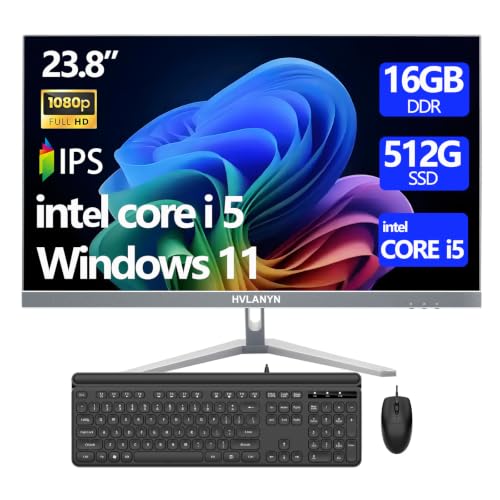
A modern all-in-one with a Core i5, 16GB of RAM, and a 512GB PCIe SSD, aimed at writers who want current specs in one unit.
Best for: a writer who wants a modern all-in-one with keyboard and mouse included Skip it if: you want detailed published specs before you spend the money
The HVLANYN all-in-one puts the same core figures as the Lenovo into a frameless 23.8-inch Full HD display: a Core i5 chip, 16GB of RAM, a 512GB PCIe SSD, and keyboard and mouse in the box. PCIe SSDs are faster than the SATA drives common at this price, which the listing highlights for boot and file-open times. HVLANYN lists a one-year manufacturer warranty, WiFi and Bluetooth.
The reason this pick sits last, despite competitive core numbers, is what the listing does not tell you. There is no published weight, no dimensions, no processor generation, no operating system named on the spec sheet. A writer who wants to know exactly what is arriving at the door will get more information from the Lenovo or the HP OmniStudio listings before buying. Against the Lenovo IdeaCentre, HVLANYN claims a PCIe SSD, which is a real speed advantage if accurate, but Lenovo publishes more of the surrounding detail. Against the two Dells, you gain a bundled display and lose half the RAM.
Pros:
- 512GB PCIe SSD claim, fastest storage type here
- Core i5 chip and 16GB RAM
- Frameless 23.8-inch Full HD display included
- Keyboard and mouse in the box
- One-year manufacturer warranty listed
Cons:
- Sparse published specs on the listing
- Processor generation not stated
- Slowest seller of the towers-and-AIOs here
- Operating system not confirmed on spec sheet
What actually decides a writing desktop?
Most guides for a writer's PC compare processor benchmarks. That is not what decides it. Prose is one of the lightest workloads a modern chip runs. Any i5 or better in this set handles Word, Scrivener, Ulysses or Google Docs with room to spare.
Three things decide the buy for a writer:
- RAM. Writers keep a lot of windows open. A manuscript, a browser with tabs of research, a PDF reader, a music app, a mail client, a chat window. 16GB is the working floor. 32GB, which the two Dell towers offer, is the figure that keeps a session smooth for years.
- SSD size and type. An SSD boot drive is not negotiable. Every second saved on file open compounds across a working day. 512GB is the practical minimum for a writer who keeps research locally. 1TB, on the two Dells, is a decade of runway.
- Screen and desk space. A larger display reduces scrolling, which reduces the small interruptions that break sentences. A tidy desk reduces the visual noise that pulls attention away from a paragraph.
The obvious specification to compare, processor speed, matters only when writing is your second job and the first involves audio or video. If it does, the i7-7700 in the Optiplex 7050 SFF earns its position.
Tower or all-in-one for a writing desk?
The picks split down the middle: three towers, three all-in-ones. Both work for writing, and the right choice comes from your desk more than your budget.
An all-in-one wins if your desk is small or shared with something else, if you value a tidy surface, or if you want one power cable and one setup step. The HP OmniStudio, Lenovo IdeaCentre and HVLANYN units all include the display, keyboard and mouse, so unboxing is short. The trade-off is repairability: when a component fails inside an all-in-one, you often replace the whole machine.
A tower wins if you already own a monitor you like, or if you want to keep the same keyboard when the machine is replaced, or if you want to add storage in two years. The Optiplex 3060 and 7050 are small enough to sit on the desk. The HP Business Tower is much larger at 17.4 x 15.7 x 6.7 in, which suits a floor position beside the desk. Towers also tend to run quieter under load because the fans have more room to spin slowly, and quiet matters when you are listening for the rhythm of a sentence.
New, renewed, or refurbished: what changes?
Three of the six picks are renewed or refurbished units. That word covers a real range, and it is fair to ask what it means before you buy.
- Renewed and refurbished machines are used units returned to a seller, tested, cleaned and repackaged. The listings for the Dell Optiplex 3060, the Optiplex 7050 SFF and the HP Business Tower all describe this process.
- Cosmetic condition varies. A renewed unit may have small marks a new one would not.
- Warranties are shorter. Both Dells here list 90 days. The HP Business Tower lists a year. The three all-in-ones list a manufacturer or seller warranty of one year.
- Components inside are older. The value of these machines is that a two- or three-year-old business PC, built to last five years in an office, still has years of writing work left in it, and costs a fraction of a new equivalent.
For a writer, a renewed business-class tower is a strong buy because the machine you get was engineered for offices that run their computers all day, every day. That is closer to a writer's use than a consumer PC designed for a few hours of gaming a week.
What more money actually buys here
The picks span three price positions across the set, from the cheapest HP Business Tower up to the HP OmniStudio at the top. Here is what steps up as you climb.
At the entry position, the HP Business Tower and the Dell Optiplex 3060 both give you a working, renewed machine with a real keyboard-and-monitor setup that you supply. The Dell adds 32GB of RAM and a full 1TB SSD. The HP adds a 2TB archive drive and a year of warranty.
At the middle position, the Optiplex 7050 SFF adds an i7 chip and dual-monitor support to the Dell formula. The HVLANYN all-in-one adds a bundled 23.8-inch screen, a keyboard and a mouse, at the cost of fewer published specs.
At the premium position, the Lenovo IdeaCentre and the HP OmniStudio buy you the tidy desk. Both give you a modern all-in-one with a 24-inch display, an included keyboard and mouse, and a year of warranty. The Lenovo pairs that with a 512GB SSD. The HP OmniStudio adds DDR5 memory and a pop-up privacy camera, but drops storage to 128GB.
The pattern is worth naming out loud: more money in this set buys a bundled display and a tidier desk, not a faster computer for writing prose.
The verdict
The best budget desktop computer for writers is the Dell Optiplex 3060. Its 32GB of RAM and 1TB SSD are the two figures that keep a working writer's session smooth for years, and its small 11.9 lb chassis fits under any desk. The 90-day warranty is short, and you supply your own monitor and keyboard, but at an entry price position with these specs, the trade is worth making.
If your writing sits alongside podcast editing, video work, or heavy Zoom recording, the Dell Optiplex 7050 SFF is the upgrade. Same 32GB RAM, same 1TB SSD, and an Intel i7-7700 at 3.60GHz with claimed dual-monitor support. It costs more and buys you the faster chip.
If a tidy desk matters more than upgrade paths, the Lenovo IdeaCentre 24 is the all-in-one to pick. 16GB of RAM, a 512GB SSD, an anti-glare 23.8-inch display, and a keyboard, mouse and Office access in the box. The cutoff is the number of open tabs and apps you keep running at once: below thirty, the Lenovo is comfortable; above, the Dell towers hold together better.
FAQ
Do writers really need 32GB of RAM?
Do writers really need 32GB of RAM to work well? No, but they benefit from it more than they expect. 16GB is the working floor and every pick here meets it. 32GB, which the two Dell Optiplex towers offer, gives you room to keep a manuscript, a browser of research tabs, a PDF reader, a music app and a chat client open for years without slowdown.
Is a renewed business desktop worth it for writing?
A renewed business desktop is worth it for writing because prose is a light workload and business-class machines are engineered for long office hours. The Dell Optiplex 3060 and 7050 SFF were built to run for years in daily commercial use. As renewed units with 90-day warranties, they cost far less than a new equivalent and still hold plenty of writing life.
What SSD size do I actually need for manuscripts and research?
The SSD size you actually need depends on how much research you keep locally. A manuscript is small: even a book-length draft with revisions is under 50MB. Research PDFs, screenshots, and audio interviews are what fill drives. 512GB, on the Lenovo and HVLANYN all-in-ones, is a comfortable minimum. 1TB, on the two Dells, is a decade of runway.
HP OmniStudio 24 or Lenovo IdeaCentre 24 for a small home office?
HP OmniStudio 24 or Lenovo IdeaCentre 24 depends on storage versus memory generation. The OmniStudio uses newer DDR5 memory and adds a pop-up privacy camera, but ships with only a 128GB SSD. The Lenovo has DDR4 memory and a 512GB SSD, which is four times the storage. For a writer with a research archive, the Lenovo is the better fit.
What is the biggest mistake buyers make in this category?
The biggest mistake buyers make is chasing processor speed instead of RAM and SSD size. A faster chip barely changes how prose feels to write, because Word and Scrivener sit idle most of the time. Running out of RAM, or waiting on a hard drive, breaks flow every few minutes. Prioritise the 32GB RAM and 1TB SSD spec sheet.
The right desktop is the one that disappears while you write. Pick the Dell Optiplex 3060 if you own a monitor and a keyboard already, and want the most RAM and storage in the set for the least money. Pick the Lenovo IdeaCentre 24 if you are starting a home office from scratch and want to open one box. Both leave you enough of your budget for the things that actually improve writing days: a chair that stops your back complaining, a lamp that does not glare on the screen, and a coffee habit you can afford to keep.