Best Portable USB Hub for Graphic Designers at Your Desk

Bus power keeps you light; a wall adapter keeps a drawing tablet steady. Here's which USB hub matches your desk, from the 1.28 oz Anker to an 8-port atolla.

By Lamar CalhounUpdated 16 min read
On this page
- What actually decides this purchase for a designer
- Best portable USB hub for graphic designers at a glance
- 1. Anker USB Hub, 4-in-1 USB Splitter — Best overall
- 2. SABRENT 4-Port Powered USB 3.0 Hub — Runner-up
- 3. MOGOOD USB Hub for Laptop — Best budget pick
- 4. TP-Link Powered USB Hub 3.0 (UH720) — Best for beginners
- 5. SABRENT 4-Port USB 2.0 Data Hub (HB-UMLS) — Best for heavy use
- 6. StarTech.com 4-Port USB 2.0 Hub (ST4200MINI2) — Best compact
- 7. atolla Powered USB Hub 3.0 — Best premium
- Powered or bus-powered: which does your desk need?
- How I screened seven hubs down to the ones here
- How many ports does a designer really use?
- When a different hub wins
- The verdict
- FAQ
The best portable USB hub for graphic designers is the Anker 4-in-1 USB Splitter, a 1.28 oz bus-powered hub that turns one port into four at 5Gbps. If your desk stays put and you need each port switched on its own, the SABRENT HB-UMP3 is the better buy with its 2.5A adapter. The deciding specification here is not port count. It is whether the hub draws power from your laptop or from a wall.
What actually decides this purchase for a designer
Most guides to the best portable USB hub for graphic designers count ports and stop there. Port count barely matters. Four is plenty for a mouse, a keyboard and two drives, and the field here runs from four ports to eight.
What decides it is power. A bus-powered hub sips current from your laptop and stays light enough to forget. A powered hub carries its own wall adapter, which keeps voltage steady when you plug in a drawing tablet, a card reader and two external drives at once. That steadiness is the whole game for a designer moving large files.
The second deciding factor is transfer speed. USB 3.0 runs at 5Gbps. USB 2.0 tops out at 480Mbps. Moving a 4GB layered file across the slow standard is a coffee break. Across the fast one it is seconds.
- Bus-powered hubs are lighter and cable-free at the wall.
- Powered hubs hold voltage under load.
- USB 3.0 is roughly ten times the throughput of USB 2.0.
Read the two figures on any listing before the port count: power source and transfer speed. Everything else is packaging.
Best portable USB hub for graphic designers at a glance
| Pick | Ports & speed | Power | Price |
|---|---|---|---|
Best overall Anker 4-in-1 USB Splitter |
4x USB-A, 5Gbps claim | Bus-powered | Check Price |
Runner-up SABRENT HB-UMP3 |
4x USB 3.0, 5Gbps claim | 2.5A adapter | Check Price |
Best budget pick MOGOOD USB Hub 3.0 |
1x 3.0 + 3x 2.0 claim | Bus-powered | Check Price |
Best for beginners TP-Link UH720 |
7x USB 3.0 + 2 charging | 12V/4A adapter | Check Price |
Best for heavy use SABRENT HB-UMLS |
4x USB 2.0, 480Mbps | Bus-powered | Check Price |
Best compact StarTech ST4200MINI2 |
4x USB 2.0, 480Mbps | Bus-powered | Check Price |
Best premium atolla 8-Port USB 3.0 |
8x USB 3.0 + charging | 5V/4A adapter | Check Price |


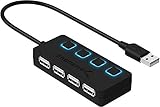


One note before the picks. The search that surfaced these hubs did not filter for anything design-specific, so treat "graphic designers" as your own checklist, not a promise printed on any box. Match the power source and the speed to how you work, and any of these serves a design desk.
1. Anker USB Hub, 4-in-1 USB Splitter — Best overall
The Anker 4-in-1 is the best portable USB hub for graphic designers because it delivers 5Gbps speed at just 1.28 oz with no wall adapter to pack.
Best for: designers who want a light hub for a mouse, keyboard and two drives Skip it if: you need to charge a tablet through the hub
At 1.28 oz, this is the second-lightest hub here, and it pairs that weight with the fast transfer standard the two-cent budget picks skip. Anker says the four USB-A ports run at up to 5Gbps, which the company frames as fast enough to move an HD movie in seconds. That claim is the manufacturer's, but the 5Gbps standard is what a designer wants when a working file balloons past a gigabyte.
The build is a 0.7 ft attached lead, so there is no separate cable to lose. Anker publishes an 18-month warranty and a 2023 release, making this the newest pick in the set and one of only a few with any stated cover at all. It sits at an entry price, the third-cheapest of the seven.
The trade-off is honest: Anker states plainly this hub does not charge devices. Plug in a phone or a tablet expecting a top-up and nothing happens. It also draws from your laptop's single port, so four hungry drives at once may starve.
Pros:
- Light at 1.28 oz
- 5Gbps transfer claim across all four ports
- 18-month warranty published
- Newest design here, 2023
- Attached cable, nothing extra to pack
Cons:
- Not designed to charge devices, per Anker
- Bus power limits it under heavy simultaneous load
- Only two sellers list it
- No individual port switches
2. SABRENT 4-Port Powered USB 3.0 Hub — Runner-up
The SABRENT HB-UMP3 matches the Anker's speed and adds a 2.5A wall adapter plus a switch on every port, at the cost of pocketability.

Best for: a fixed desk where each port needs its own on/off switch Skip it if: you carry your hub in a laptop sleeve
This hub is where the powered approach starts to earn its place. SABRENT says it adds four USB 3.0 ports at up to 5Gbps and ships with a 2.5A power adapter, so a card reader and two drives can all draw current without the host laptop flinching. That steadiness is exactly what the Anker gives up to stay light.
Each port has its own switch and LED, per SABRENT. For a designer, that means killing a drive's power without unplugging it, which matters when you cycle through backup disks. The body measures 2.08 x 3.51 x 5.12 in and weighs 1.5 oz, and it ships as a count of two.
SABRENT publishes a 1 year limited warranty. It sits at a premium price, the third-dearest here, and only one seller lists it.
The trade-off against the Anker is bulk and cabling. You are carrying a hub plus a wall brick, which is the opposite of portable. On a desk it wins; in a bag it loses.
Pros:
- 2.5A powered adapter holds voltage under load
- 5Gbps USB 3.0 claim
- Individual switch and LED per port
- Ships as a two-count
- Published 1 year limited warranty
Cons:
- Wall adapter kills portability
- Premium price, one of the dearest here
- Only one seller lists it
- A 2015 design
3. MOGOOD USB Hub for Laptop — Best budget pick
The MOGOOD is the cheapest hub here and the slimmest at 0.39 in thick, trading published specs for the lowest possible outlay.

Best for: a light bag and the smallest possible outlay Skip it if: you want a published warranty or a stated weight
This is the cheapest of the seven, and it leans into that. MOGOOD says the hub splits one port into four: one USB 3.0 and three USB 2.0, with the fast port rated up to 5Gbps. For a designer that means one quick drive and three slots for a mouse, keyboard and dongle. Only the single fast port carries the 5Gbps claim, so plan which device gets it.
At 0.39 x 2.76 x 1.97 in, it is the thinnest hub in the set, built to sit flush against a laptop's left side. MOGOOD calls it slim and light for travel, and the angled connector keeps it out of the way.
Here the trade-off shows in the data itself. There is no published weight and no stated warranty, where the Anker gives both. You also get one fast port instead of four, so heavy file work bottlenecks fast.
Pros:
- Cheapest pick of the seven
- Slimmest at 0.39 in thick
- Mix of one 3.0 and three 2.0 ports
- Plug and play, no drivers
- Angled connector sits flush
Cons:
- Only one port carries the 5Gbps claim
- No published weight
- No stated warranty
- One seller only
4. TP-Link Powered USB Hub 3.0 (UH720) — Best for beginners
The TP-Link UH720 is the easiest to grow into, with seven USB 3.0 ports, two charging ports and the longest warranty in the set.

Best for: a first proper desk hub with phone charging built in Skip it if: portability matters at all
If you are setting up a first serious desk, this hub removes the guesswork. TP-Link says the UH720 expands one port to seven USB 3.0 ports at up to 5Gbps, plus two dedicated 5V/2.4A charging ports for a phone or tablet. That charging is the feature the Anker openly lacks, so a beginner never hits the wall of a hub that will not top up a device.
It runs on a 12V/4A adapter and carries a power button, and TP-Link lists overheat, overload, overvoltage and short-circuit protections. For someone nervous about frying a drive, that circuit design is reassuring, though it is the maker's claim rather than a measured result.
The warranty is 2 years, the longest here, tied only with the StarTech. The catch is size. At 1.1 lb and 2.8 x 7.8 x 5.8 in, this is the heaviest hub in the set by a wide margin. Portable it is not. It sits at a premium price too, the dearest bar the atolla.
Pros:
- Seven USB 3.0 ports at 5Gbps claim
- Two dedicated charging ports
- Longest warranty here, 2 years
- Power button and stated protections
- Works across Windows, Mac, Chrome, Linux
Cons:
- Heaviest pick at 1.1 lb
- Large 2.8 x 7.8 x 5.8 in body
- Premium price
- Not portable in any real sense
5. SABRENT 4-Port USB 2.0 Data Hub (HB-UMLS) — Best for heavy use
The second SABRENT is the one buyers reach for most often here, a rugged 2 oz USB 2.0 hub built for constant plugging and unplugging.
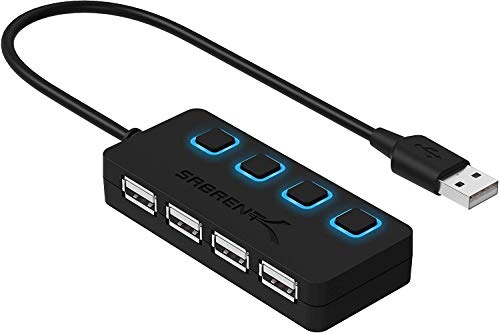
Best for: flash drives, dongles and peripherals you swap all day Skip it if: you move fast files between drives
This hub sells faster than the rest of this set, and its appeal is durability over speed. SABRENT says it adds four USB 2.0 ports, with individual on/off switches and LED indicators for each. A designer who swaps flash drives, licence dongles and a mouse all day gets a switch to cut power cleanly instead of yanking a plug.
It weighs 2 oz across a 0.61 x 3.4 x 1.4 in body, so it is compact enough for a bag despite being the heaviest of the small hubs. It is the second-cheapest here, an entry price. Setup is plug and play with hot swapping, per SABRENT, and it is reverse compatible with USB 1.1.
The honest limit is speed. This is a 480Mbps USB 2.0 hub, so moving a large layered file to an external drive drags compared to the 5Gbps picks. SABRENT also notes it does not charge devices. Buy it for peripherals, not for file shuttling.
Pros:
- The one buyers choose most often here
- Individual switch and LED per port
- Compact at 0.61 x 3.4 x 1.4 in
- Second-cheapest pick
- Plug and play, hot swappable
Cons:
- USB 2.0 only, 480Mbps ceiling
- Does not charge devices
- One seller lists it
- Slow for large file transfers
6. StarTech.com 4-Port USB 2.0 Hub (ST4200MINI2) — Best compact
The StarTech ST4200MINI2 is the lightest hub in the set at 1.16 oz, with a built-in cable and a 2-year warranty for true travel.

Best for: the smallest travel footprint with a built-in cable Skip it if: you need USB 3.0 transfer speed
For a designer who lives out of a bag, this is the one to grab. At 1.16 oz it is the lightest pick here, edging out the Anker, and StarTech says the built-in cable and small-footprint housing are made to carry anywhere. The body measures 0.6 x 3.2 x 1.1 in, so it disappears into a laptop sleeve.
StarTech adds extra spacing between the four ports for larger USB connectors, which matters when your dongles are wide and crowd each other on lesser hubs. It is bus-powered with native support across Windows, Mac, Chrome OS and Linux, so there is no adapter to pack and no driver to install.
The warranty runs 2 years, matching the TP-Link for the longest here, on a hub that costs a fraction as much. It sits mid-range, the fourth of seven on price.
The trade-off is the same as the heavy-use SABRENT: these are USB 2.0 ports at 480Mbps. Grab it for a mouse, keyboard and dongle on the road, not for pushing large art files to a drive.
Pros:
- Lightest pick at 1.16 oz
- Built-in cable, nothing extra to pack
- Extra port spacing for wide connectors
- 2-year warranty
- Mid-range price
Cons:
- USB 2.0 only, 480Mbps
- Slow for large file transfers
- One seller lists it
- No individual port switches
7. atolla Powered USB Hub 3.0 — Best premium
The atolla 8-port hub packs the most ports here plus a smart charging port and a 5V/4A adapter, for a fully loaded studio desk.

Best for: a loaded studio desk with card readers, drives and a tablet Skip it if: you want to slip it into a laptop bag
This is the top of the field for sheer capacity. The listing counts eight USB 3.0 ports, more than any other pick, with one dedicated smart charging port atolla says can top up an iPhone or iPad faster. A designer running two drives, a card reader, a tablet and a couple of dongles finally has slots to spare.
Each port carries its own on/off switch, per atolla, and a 5V/4A adapter feeds the array. The body weighs 0.56 lb across 0.91 x 6.3 x 1.77 in, so it is a desk fixture rather than a travel piece. The listing notes an 18-month warranty and lists compatibility from Windows XP through 11 and Mac OS X.
It is the most expensive pick here. The trade-off is the familiar one for powered hubs, doubled: it is bulky, it needs a wall socket, and the listing's own text slips between calling it seven-port and eight-port, so confirm the count before you rely on all eight.
Pros:
- Most ports here, eight USB 3.0
- Dedicated smart charging port
- 5V/4A powered adapter
- Individual switch per port
- 18-month warranty noted
Cons:
- Most expensive pick in the set
- Bulky at 0.56 lb, not portable
- Listing is inconsistent on port count
- Needs a wall socket
Powered or bus-powered: which does your desk need?
This is the one question that sorts the whole list, so answer it before anything else. A bus-powered hub takes all its current from your laptop's port. A powered hub plugs into the wall and hands out steady voltage no matter how many drives you connect.
The rule of thumb for a design workflow:
- Only a mouse, keyboard and one drive? Bus power is fine. Choose the Anker or the StarTech.
- Two spinning drives plus a card reader? Go powered. The SABRENT HB-UMP3 or the atolla hold voltage under that load.
- Need to charge a phone or tablet from the hub? You must go powered, because the bus-powered picks here either can't charge or don't claim to.
The tell is the box contents. If a listing mentions a wall adapter, an amp figure like 2.5A or 5V/4A, it is powered. If it only mentions a cable, it is bus-powered. Bus power buys portability; wall power buys stability. A designer rarely gets both in one hub, which is why this list has a light winner and a heavy runner-up.
How I screened seven hubs down to the ones here
I set the criteria first, then ranked against them. Three things carried the most weight for a design desk.
- Power source, weighted heaviest, because it decides both portability and stability under load.
- Transfer speed, second, splitting the 5Gbps picks from the 480Mbps ones.
- Weight and footprint, third, since "portable" is in the brief.
Warranty and port switches broke ties after that. I compared every published figure side by side rather than trusting any single listing's headline.
That weighting is why the Anker wins on a mere four ports. It scores top on power source for portability, top on speed at 5Gbps, and near-top on weight at 1.28 oz. The eight-port atolla scores higher on ports alone but loses on weight and packability, so it lands as the premium desk pick, not the overall.
The USB 2.0 pair, the StarTech and the heavy-use SABRENT, held their spots on weight and durability despite the slower standard. A designer who only hangs peripherals off a hub never notices 480Mbps.
How many ports does a designer really use?
Count your actual devices before you pay for ports you'll never fill. A typical design desk runs a mouse, a keyboard, one or two external drives and maybe a card reader or a drawing tablet dongle. That is four to six.
Four ports covers most people. The Anker, both SABRENTs and the StarTech all give you four, and that is enough for a mouse, keyboard and two drives. Step up to the TP-Link's seven or the atolla's eight only if you genuinely juggle card readers, tablets and multiple drives at once.
Here is the trap. Buying an eight-port hub "to be safe" means carrying a 0.56 lb brick and a wall adapter for slots you leave empty. The best portable USB hub for graphic designers is the one sized to your real kit, not your imagined one. Empty ports weigh the same as full ones.
When a different hub wins
The Anker is the default, but three clear conditions flip it.
- You charge a tablet from the hub. Then the Anker is out, because it does not charge. Go to the TP-Link UH720 with its two 5V/2.4A charging ports, or the atolla's smart charging port.
- You run three or more drives at once. Bus power gets shaky. The SABRENT HB-UMP3 and its 2.5A adapter, or the atolla's 5V/4A, keep voltage steady.
- You only hang peripherals, never move files through the hub. Then 5Gbps is wasted. The StarTech at 1.16 oz or the heavy-use SABRENT at 2 oz do the job cheaper.
Match the flip to your actual day. If none of these describe you, the Anker stays the pick.
The verdict
The best portable USB hub for graphic designers is the Anker 4-in-1 USB Splitter. It combines the 5Gbps transfer speed that matters for large files with a 1.28 oz body and an attached cable, so there is nothing extra to pack. Add an 18-month warranty and a 2023 design, the newest here, and it is the hub I'd hand most designers without a second thought.
Two conditions flip that choice. First, if you need to charge a phone or tablet through the hub, the Anker can't do it, and the TP-Link UH720 with two dedicated charging ports and a 2-year warranty becomes the smarter buy despite its 1.1 lb weight. Second, if you run several drives at once, bus power gets unstable, and the SABRENT HB-UMP3 with its 2.5A adapter and per-port switches holds voltage where the Anker sags.
The runner-up's exact advantage over the winner is that steady wall power and a switch on every port. You give up portability to get it. For a fixed studio desk, that's a fair trade. For a bag, the Anker wins every time.
FAQ
Is a portable USB hub worth it for a graphic designer?
A portable USB hub is worth it if your laptop has fewer ports than your workflow needs, which describes most modern machines. One 1.28 oz Anker turns a single port into four, enough for a mouse, keyboard and two drives. For a designer juggling peripherals and external storage, that expansion pays for itself the first day you stop unplugging things.
What is the best value USB hub in this list?
The best value pick balances price against speed, and the MOGOOD wins on outlay as the cheapest of the seven, offering one USB 3.0 and three USB 2.0 ports. If you want a published warranty for the money, the StarTech at a mid-range price adds a 2-year cover and 1.16 oz weight. Value depends on whether cover matters more than cost to you.
Does the Anker hub charge my phone or tablet?
The Anker hub does not charge phones or tablets. Anker states plainly that this 4-in-1 splitter is not designed to charge devices. It moves data at a claimed 5Gbps and nothing more. If charging is on your list, the TP-Link UH720 has two 5V/2.4A charging ports, and the atolla adds a dedicated smart charging port for the same job.
Anker or SABRENT HB-UMP3 for a design desk?
Anker or SABRENT comes down to your desk. The Anker is bus-powered at 1.28 oz, ideal if you carry it and run light loads. The SABRENT HB-UMP3 ships a 2.5A adapter and a switch per port, so it holds voltage when three drives draw at once. Fixed desk with heavy load, take the SABRENT. Travel and light use, take the Anker.
What is the biggest mistake buying a portable USB hub?
The biggest mistake is buying on port count and ignoring the power source. Eight ports mean nothing if a bus-powered hub can't feed three drives, and a powered brick isn't portable. Check whether the listing mentions a wall adapter and an amp figure like 2.5A. That single detail decides both stability and whether the hub actually fits your bag.
Start by counting the devices on your desk right now, then read one figure on the listing before anything else: is it bus-powered or does it ship a wall adapter? That answer, matched to your real kit, points you straight at the right pick. For most designers on the move, the Anker 4-in-1 is the sane default. It's light, it's fast at a claimed 5Gbps, and it leaves the wall socket free for your laptop charger. Buy heavier and powered only when a tablet or a stack of drives forces your hand.