Best OLED Monitor for Content Creators: ASUS ProArt

Five OLED monitors, ranked for people who edit photos, colour-grade video and stream. The winner factory-calibrates to Delta E under 1.5; a portable 14-inch OLED covers travel.

By Lamar CalhounUpdated 14 min read
On this page
- Best OLED monitor for content creators at a glance
- How I cut the OLED field down to five
- What actually decides an OLED for creative work?
- 1. ASUS ProArt Display PA279CDV — Best overall
- 2. AOC Q27GAZDV — Best premium
- 3. Upperizon 14" Portable 4K OLED — Best budget pick
- 4. Deco Gear OLED27 — Most versatile
- 5. Samsung Odyssey OLED G6 — Best warranty
- Do content creators really need 4K, or is QHD enough?
- QD-OLED versus WOLED: does the panel type matter here?
- What the listings do not tell you about OLED burn-in
- The verdict
- FAQ
The best OLED monitor for content creators is the ASUS ProArt Display PA279CDV, a 26.5-inch 4K QD-OLED that ships Calman Verified at Delta E under 1.5 with 99% DCI-P3 and pushes 96W over USB-C to a laptop. If you also play competitive games on the same panel, the AOC Q27GAZDV runs QHD at 240Hz with a QD-OLED panel and the same three-year warranty. Most guides compare refresh rate first. For creative work that ranks fourth at best, behind colour accuracy, panel type and connectivity.
Best OLED monitor for content creators at a glance
| Pick | Resolution & refresh | Colour accuracy | Price |
|---|---|---|---|
Best overall ASUS ProArt PA279CDV |
4K 3840×2160 120Hz |
99% DCI-P3 ΔE < 1.5 claim |
Check Price |
Best premium AOC Q27GAZDV |
QHD 2560×1440 240Hz |
110% DCI-P3 claim 147% sRGB claim |
Check Price |
Best budget pick Upperizon 14" Portable |
4K 3840×2400 60Hz |
100% DCI-P3 claim ΔE < 2 claim |
Check Price |
Most versatile Deco Gear OLED27 |
QHD 2560×1440 280Hz |
98% DCI-P3 claim 99% sRGB claim |
Check Price |
Best warranty Samsung Odyssey OLED G6 |
QHD (1440p) QD-OLED |
Pantone Validated HDR10 |
Check Price |




How I cut the OLED field down to five
I started with the buyer profile: someone editing photos, cutting video, streaming, illustrating, or doing graphic design on a computer. Not a pro colourist grading in a suite. Not a competitive gamer looking for an excuse to buy pretty. Someone who works on a screen and would also like it to look great when the day is done.
From there I lined up every OLED listing against three profiles a creator falls into:
- Desktop primary. One screen, on a desk, in front of a chair, for hours a day.
- Reference secondary. A calibrated panel next to a laptop for colour checks on the road.
- Mixed use. Creative work by day, gaming by night, on the same panel.
Then I cut anything that could not answer at least one of those cleanly. Curved gaming panels without published colour figures went first. Ultrawides without a stated Delta E followed. What survived is five monitors that each own one of those profiles, plus the outlier that owns the "second screen in a bag" case.
The five picks are not the five cheapest, and they are not the five with the highest refresh rate. They are the five whose specifications map to a real creator scenario. Two of the five publish a Delta E figure. Three publish a DCI-P3 percentage. Four publish a warranty term. One weighs 1.33 lb.
What actually decides an OLED for creative work?
Refresh rate does not. Neither does peak brightness on paper. What decides an OLED for a content creator is a short list, in order:
- Factory colour accuracy, expressed as Delta E. Below 2 is usable. Below 1.5 is genuinely reference-grade for the price bracket.
- Colour gamut coverage, expressed as a percentage of DCI-P3 or Adobe RGB. Under 95% DCI-P3 and the panel is not doing what an OLED should for you.
- Connectivity, especially USB-C with Power Delivery if you edit on a laptop.
- Panel type and burn-in safeguards, because a creator leaves toolbars, timelines and menus on screen for hours.
- Warranty length, because OLED panels degrade differently to LCDs and a three-year term is meaningfully better than a one-year one.
Refresh rate matters after those, and only for the mixed-use profile. A 120Hz OLED is smoother than any LCD you have used. Going from 120Hz to 240Hz for a colour grade changes nothing.
Read the picks below with those five levers in mind. Where a listing skips a figure, that silence is itself a signal.
1. ASUS ProArt Display PA279CDV — Best overall
The ProArt PA279CDV is the only monitor in this set that publishes both a Delta E figure and a DCI-P3 percentage, and it hits 4K at 120Hz over a single USB-C cable.
Best for: photo and video editors who need factory colour accuracy on a Mac or PC. Skip it if: you mostly play twitch shooters and want the highest refresh rate you can find.
The differentiator inside this set is the specification sheet, not the marketing. ASUS lists a 26.5-inch 4K UHD QD-OLED panel at 120Hz with a 0.1 ms grey-to-grey response time. ASUS says the display is Calman Verified and factory-calibrated to Delta E under 1.5, with true 10-bit colour, 100% sRGB and 99% DCI-P3. Peak brightness is quoted at 1000 nits with VESA DisplayHDR True Black 400. USB-C carries up to 96W of power to a connected laptop, which covers most 14-inch and many 16-inch MacBooks without a separate charger.
That combination is why it wins. You get a 4K editing canvas, a calibrated panel out of the box, a single cable to a laptop, and DisplayPort daisy-chaining if you add a second display later. The trade-off is refresh rate: at 120Hz it will feel slow next to a 240Hz gaming panel for competitive play. It is also the most expensive pick here.
Pros:
- 4K 3840×2160 QD-OLED at 120Hz
- Calman Verified, ΔE under 1.5 claim
- 99% DCI-P3, 100% sRGB, 10-bit
- USB-C with 96W Power Delivery
- Three-year warranty with advance replacement
Cons:
- The most expensive pick in this set
- 120Hz will feel slow to competitive gamers
- Weight of 12.4 lb is on the heavy side for wall arms
2. AOC Q27GAZDV — Best premium
The AOC Q27GAZDV runs a QD-OLED panel at 240Hz and QHD, with the same three-year warranty as the winner, for creators who game seriously on the same screen.
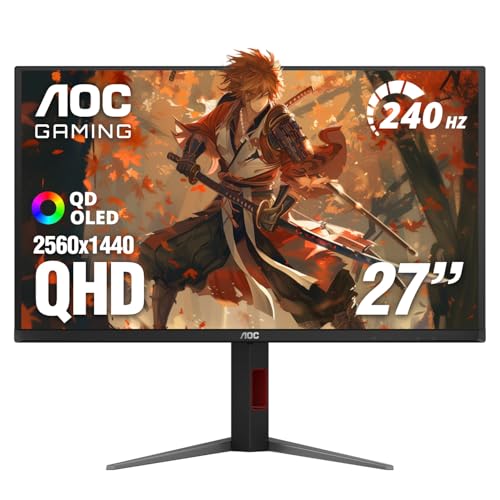
Best for: creators who also game seriously and want QHD at 240Hz on one screen. Skip it if: your timeline is 4K and you export at native resolution every day.
This is the pick for the mixed-use profile. AOC pairs a QD-OLED panel with a 240Hz refresh rate at 2560×1440 and NVIDIA G-SYNC Compatible adaptive sync. AOC quotes 147% sRGB and 110% DCI-P3 coverage, which are volume figures rather than accuracy figures, so treat them as gamut headroom rather than a Delta E promise. The stand tilts, swivels, pivots and adjusts for height, and a USB 3 hub is built in. HDMI 2.1 and DisplayPort 1.4 are both present, which matters if you run a PS5 or an Xbox Series X into the same panel between edits.
Where it lands inside this set is precise: it is the second-cheapest pick and it carries a three-year manufacturer warranty, matching the winner on term. The published dimensions are 21.2 x 9.45 x 24 in. What it does not do is 4K, and AOC does not publish a Delta E figure, so a serious grade still belongs on the ProArt.
Pros:
- QD-OLED at QHD 240Hz
- G-SYNC Compatible adaptive sync
- HDMI 2.1 and DisplayPort 1.4
- Three-year manufacturer warranty
- Height, tilt, swivel and pivot adjustment
Cons:
- QHD, not 4K, for pixel-peep editing
- No published Delta E figure
- No USB-C power delivery to a laptop
3. Upperizon 14" Portable 4K OLED — Best budget pick
The Upperizon is a 4K OLED reference you can put in a laptop sleeve, and it is the cheapest OLED in this set.

Best for: editors on the move who need a calibrated OLED reference next to a laptop. Skip it if: you want a primary desktop display with a proper adjustable stand.
The Upperizon owns the reference-secondary profile no other pick here even attempts. It is a 14-inch OLED at 3840×2400, which is a taller 16:10 4K rather than a 16:9 UHD. Upperizon claims factory calibration to Delta E under 2, 100% DCI-P3, and 111% NTSC. The panel measures 15.7 x 0.39 x 7.87 in, weighs 1.33 lb, and the listing describes an aluminium body with a sleeve case, a built-in kickstand and VESA mounting. Connectivity is two full-featured USB-C ports and one HDMI, so a single cable from a MacBook can carry both video and power.
The trade-off is honest. There is no height-adjustable stand, no ergonomic pivot, no 96W power delivery back to the host, and no three-year warranty; Upperizon lists two years. Only one seller stocks it. Treat it as the second screen you take to a shoot or a hotel edit, not the desktop monitor you sit in front of eight hours a day.
Pros:
- 4K OLED at 14 in, 1.33 lb
- ΔE under 2 claim, 100% DCI-P3 claim
- Two USB-C ports plus HDMI
- Built-in kickstand and VESA compatible
- Cheapest OLED in this set
Cons:
- No adjustable stand for desk use
- Only one seller lists it
- Two-year warranty rather than three
- 60Hz refresh caps gaming use
4. Deco Gear OLED27 — Most versatile
The Deco Gear OLED27 pushes 280Hz and quotes 98% DCI-P3 on the same panel, which is a rare split across creative and competitive use.

Best for: streamers and designers splitting time between creative work and fast-paced games. Skip it if: you need the strongest published warranty in this set.
The Deco Gear reads as a genuine mixed-use panel on paper. It is a 27-inch QHD OLED at 2560×1440 with a 280Hz refresh rate, a 0.03 ms response-time claim and a 1.5M:1 contrast claim. Deco Gear says the panel covers 98% DCI-P3 and 99% sRGB, which is the highest published sRGB figure among the QHD gaming picks here. Adaptive Sync and HDR400 support round out the gaming half. The stand tilts, swivels, pivots and adjusts for height. HDMI 2.1 and DisplayPort 1.4 are both present.
Where it slots in this set is mid-priced. It is also the slowest seller of the five and carries the shortest warranty of the group, one year limited from the manufacturer. If your day is a streaming schedule with editing between shows, this reads well. If a panel needs to last the length of a longer warranty, the Samsung and the ASUS are better fits for the same money bracket. Only one seller lists it.
Pros:
- 280Hz refresh at QHD OLED
- 98% DCI-P3, 99% sRGB claims
- HDR400 and adaptive sync
- Full ergonomic stand
- HDMI 2.1 and DisplayPort 1.4
Cons:
- One-year limited warranty, shortest here
- Only one seller lists it
- No USB-C power delivery
- No published Delta E figure
5. Samsung Odyssey OLED G6 — Best warranty
The Samsung Odyssey OLED G6 pairs a QD-OLED panel with Pantone Validated colour, a three-year term and Samsung's own OLED Safeguard burn-in system.

Best for: creators who want Pantone Validated colour and Samsung's burn-in safeguards. Skip it if: USB-C power delivery to a laptop is a hard requirement.
The G6 is a 27-inch QD-OLED at QHD (1440p), and Samsung leans on three things a creator will care about. Samsung says the panel is Pantone Validated and reproduces 2100+ colours and 110+ skin-tone shades, which is Samsung's shorthand for a factory colour promise, though Samsung does not publish a Delta E figure. Samsung says OLED Safeguard actively helps prevent burn-in through a thermal modulation system, which matters if your day involves fixed toolbars and timelines. Samsung's Glare Free Technology and HDR10 support round out the panel case.
Where it sits in this set is toward the top of the price band, and it weighs 8.38 lb, which is the lightest of the desktop picks here. The warranty is three years from the manufacturer, matching the AOC and the ASUS. What is missing is a USB-C power delivery figure and a stated DCI-P3 percentage, so laptop-only users and colour-numbers people should look at the ProArt first. The published dimensions are 21.4 x 11.7 x 24 in.
Pros:
- QD-OLED with Pantone Validated colour
- OLED Safeguard burn-in system
- Three-year manufacturer warranty
- HDR10 and Glare Free coating
- Lightest desktop pick at 8.38 lb
Cons:
- No published Delta E figure
- No stated USB-C Power Delivery
- No published DCI-P3 percentage
- QHD rather than 4K
Do content creators really need 4K, or is QHD enough?
Short answer: most do not, and QHD is enough for a lot of creative work. Long answer: it depends on what you make.
If you shoot photos at 24 megapixels or higher, or you edit 4K video and want to see it at native resolution, a 4K panel earns its place fast. The ASUS ProArt PA279CDV is the only 4K desktop pick in this set at 3840×2160. The Upperizon is 4K too, at 3840×2400, but at 14 in the pixel density is very high and menus can feel small without OS scaling.
If your work is web design, illustration, graphic design, streaming or short-form video for social platforms, QHD at 27 in is a comfortable working density. The AOC, the Deco Gear and the Samsung all sit there. You get more usable panel area than 1080p, sharper text than a 4K panel scaled to 150%, and, on the gaming picks here, a real refresh-rate bonus.
The wrong reason to buy 4K is because it sounds better than QHD. The right reason is a specific workflow that needs the pixels.
QD-OLED versus WOLED: does the panel type matter here?
QD-OLED and WOLED are the two OLED subtypes you will see on monitor listings. They render colour differently, and creators tend to care about that.
- QD-OLED, used on the ASUS ProArt, the AOC and the Samsung in this set, layers a quantum-dot colour filter over a blue OLED emitter. It typically hits wider colour volume at high brightness. Vendors tend to publish stronger DCI-P3 figures on QD-OLED panels.
- WOLED uses a white OLED subpixel with colour filters. It has its own strengths, particularly in fine text rendering, and it has been on the market longer.
For a creator, three practical points fall out of that.
- If DCI-P3 volume is the priority, a QD-OLED panel is the safer default.
- If long hours of small text are the priority, look at the fringing and subpixel layout in person before buying either type.
- Whichever you choose, burn-in mitigation is a real feature. Samsung publishes OLED Safeguard by name. Every OLED benefits from a pixel-shift feature and a screen saver.
The Deco Gear and Upperizon listings do not specify QD-OLED versus WOLED explicitly, so verify on the product page before ordering if this matters to your workflow.
What the listings do not tell you about OLED burn-in
OLED burn-in is not a myth, but it is not the everyday problem some LCD advocates claim either. What the listings on this page mention is thin: only Samsung names a burn-in mitigation system by feature, OLED Safeguard, described as a thermal modulation approach. The others rely on generic pixel-refresh routines that all modern OLED monitors run.
What is not in the listings, and matters for a creator specifically:
- Static UI elements are the risk. Toolbars, docks, timelines, waveform monitors, chat overlays.
- Auto-hide the taskbar and the dock. Dim the screen when you leave.
- Vary content. If you edit for eight hours, the last thing you do before you walk away should not be leaving the same frame paused on screen overnight.
- Run the panel's built-in pixel-refresh cycle when it prompts you.
Warranty length is your backstop. Three of these picks publish three-year terms, one publishes two years, one publishes one year. That gap is not marketing. It reflects how confident the vendor is that the panel will hold up under long daily use.
The verdict
The best OLED monitor for content creators is the ASUS ProArt Display PA279CDV. It is the only pick in this set that publishes both a factory Delta E figure, under 1.5 by ASUS's own calibration, and a DCI-P3 percentage, at 99%. It is 4K at 120Hz, it carries 96W over a single USB-C cable to a laptop, and the warranty is three years with advance replacement. For someone whose day is photo editing, video work, illustration or design, that specification sheet does more of what a creator asks a monitor to do than any other panel here.
Two conditions flip the pick. If you play competitive games seriously on the same screen, the AOC Q27GAZDV is the better buy: QD-OLED at QHD 240Hz, G-SYNC Compatible, three-year warranty, and the second-cheapest pick here. If you edit on the road and need a calibrated reference in a bag, the Upperizon 14" portable is a genuinely useful second screen at 1.33 lb, with an aluminium body, a kickstand and dual USB-C. The Samsung Odyssey OLED G6 is the pick for someone who wants Pantone Validated colour and named burn-in mitigation. The Deco Gear is the mixed-use flex at 280Hz.
FAQ
Is an OLED monitor worth it for content creators?
Is an OLED monitor worth it depends on what you edit and how much time you spend staring at black areas of the frame. For photo, video and design, an OLED's per-pixel contrast, wide colour gamut and fast response give a visibly better working image than a comparable IPS. Factory calibration and warranty length matter more than the badge on the box, so pick a panel that publishes both.
What is the best OLED monitor for content creators on a Mac?
The best OLED monitor for content creators on a Mac in this shortlist is the ASUS ProArt Display PA279CDV. ASUS lists Mac compatibility and a colour temperature optimised for MacBook displays, and the panel accepts 96W of USB-C Power Delivery from a MacBook Pro on a single cable. Delta E is quoted under 1.5, DCI-P3 coverage at 99%, and the resolution is 4K at 120Hz.
How does the ProArt PA279CDV compare to the AOC Q27GAZDV?
The ProArt PA279CDV compares to the AOC Q27GAZDV as a colour-first 4K editing panel versus a colour-capable QHD gaming panel. Both are QD-OLED and both carry three-year warranties. ASUS publishes Delta E under 1.5 and 99% DCI-P3 at 4K 120Hz with 96W USB-C. AOC quotes 110% DCI-P3 volume at QHD 240Hz with G-SYNC. Editors take the ASUS; mixed creator-gamers take the AOC.
Do I need a Delta E figure below 2 for creative work?
You need a Delta E figure below 2 if colour reproduction has to be accurate, which for most creators it does. Delta E measures how close a displayed colour is to the target. Under 2 is generally considered indistinguishable to the eye. Under 1.5 is reference-grade for this price bracket. Two of the five picks here, ASUS at under 1.5 and Upperizon at under 2, publish a Delta E figure.
What are the biggest OLED monitor pitfalls to avoid?
The biggest OLED monitor pitfalls to avoid are buying on refresh rate alone, ignoring the warranty term, and leaving static UI elements on screen for hours without a pixel-shift routine. Also verify USB-C Power Delivery wattage if you plan to run a laptop from a single cable; only the ASUS in this set publishes a figure, at 96W. Finally, do not assume every OLED is QD-OLED.
Pick one workflow to optimise for, then buy the panel whose specification sheet answers it. For most people making photos, video, illustrations or design work, that is the ProArt PA279CDV: it is the only monitor here that publishes a Delta E under 1.5 alongside 99% DCI-P3 at 4K 120Hz, with USB-C at 96W and a three-year warranty. Order it, run the pixel-refresh cycle when it prompts you, hide the dock or taskbar during long sessions, and calibrate again in six months. Everything else in this roundup is a good answer to a different question.