Best Budget Mesh WiFi Systems: Deco X55 Leads

Five mesh kits, ranked by the specification that actually decides a home lab build: port count per node and whether wired backhaul is supported. The cheapest pick here also happens to be the most wireable.

By Lamar CalhounUpdated 15 min read
On this page
- Best budget mesh wifi system for engineers at a glance
- How I screened these five mesh kits
- Is a budget mesh wifi system for engineers enough for a home lab?
- Ports and backhaul: what actually decides this buy
- 1. TP-Link Deco X55 AX3000 WiFi 6 Mesh System — Best overall
- 2. Amazon eero 7 dual-band mesh Wi-Fi 7 router — Runner-up
- 3. TP-Link Deco 7 Pro Tri-Band WiFi 7 BE10000 Whole Home Mesh — Best premium
- 4. NETGEAR Orbi 370 Series WiFi 7 Mesh System — Best for pros
- 5. Google WiFi - AC1200 — Best for beginners
- What more money buys across these five kits
- What the listings never tell you
- The verdict
- FAQ
The best budget mesh wifi system for engineers is the TP-Link Deco X55, because each of its three units carries 3 Gigabit Ethernet ports and supports wired Ethernet backhaul, and it is the cheapest of the five kits here. If your internet plan already runs past 1 Gbps, the Deco 7 Pro with its four 2.5G WAN/LAN ports is the better buy.
Most comparisons of these kits stop at the wireless number on the box. AX3000, BE10000, AC1200. That figure describes the theoretical link between a node and a client sitting a metre away, which is not the condition anyone actually builds for. The number that decides a multi-node install is how the nodes talk to each other, and whether you can take that conversation off the air entirely.
Best budget mesh wifi system for engineers at a glance
| Pick | Ports per node | Wired backhaul? | Price |
|---|---|---|---|
Best overall TP-Link Deco X55 AX3000 WiFi 6 Mesh System |
3x Gigabit | Yes, stated | Check Price |
| 2x 2.5 GbE | Not stated | Check Price | |
Best premium TP-Link Deco 7 Pro Tri-Band WiFi 7 BE10000 |
4x 2.5G, 1x USB 3.0 | Yes, stated | Check Price |
Best for pros NETGEAR Orbi 370 Series WiFi 7 Mesh System |
Not listed | Enhanced Backhaul claim | Check Price |
Best for beginners Google WiFi - AC1200 |
Not listed | Not stated | Check Price |





How I screened these five mesh kits
I weighted four criteria, in this order.
- Ports per node, at 40%. A mesh node with one spare port is a wireless access point. A node with three is a small switch you can hang a NAS, a Pi and a managed printer off. This is the single field that separates a usable home-lab node from a consumer puck.
- Wired backhaul support, at 25%. If a listing states it, the node can carry mesh traffic over copper instead of stealing airtime from clients.
- Published specification depth, at 20%. Weight, dimensions, warranty term and model number. A listing that publishes all four lets you plan a rack shelf or a shelf bracket before the box arrives. Two of these five publish barely half.
- Price position, at 15%. Every pick here is judged against the other four, not against the wider market.
Those weights are why the cheapest kit wins and why the most expensive Wi-Fi 7 system does not. Coverage claims got no weight at all, because a square-footage figure printed by a manufacturer describes an empty room, not your plasterboard and your foil-backed insulation.
I cut anything sold as a single unit, since a mesh comparison needs multi-node kits. Two of the five survivors publish no port count and no weight, which is a mark against them and is reflected in where they land.
Is a budget mesh wifi system for engineers enough for a home lab?
Amazon's results for this search do not filter by profession, so nothing here is built or certified for engineering work specifically. No pick in this set carries a stated feature aimed at that use. Treat "for engineers" as your own requirement and judge it against the published specifications, which is what the rest of this guide does.
That said, the requirement translates cleanly into things you can check on a listing:
- Enough Ethernet ports at each node to land wired gear where you actually sit
- Stated support for wired backhaul, so the mesh link is deterministic instead of variable
- A WAN port that matches or exceeds your service plan speed
- A published warranty term, so a dead node is a claim rather than a purchase
The Deco X55 satisfies three of those four outright, with a 2 year manufacturer warranty and 3 Gigabit ports on every unit. It falls short on the fourth if you pay for multi-gig service, since its ports top out at Gigabit. The Deco 7 Pro is the pick that closes that gap.
Ports and backhaul: what actually decides this buy
Wireless backhaul means each node relays traffic to the next one over the air, on the same radios serving your laptop. Every hop halves usable throughput on a dual-band system. That is why a kit advertising 5 Gbps can measure a fraction of that on the far node.
Wired backhaul means the nodes talk over Ethernet instead. Airtime goes back to your clients. The Deco X55 and the Deco 7 Pro both state support for it. The Orbi 370 describes "Enhanced Backhaul" without stating a wired option, and TP-Link is explicit where NETGEAR is vague.
So the deciding question is not which kit is fastest. It is this: do you have, or can you run, an Ethernet drop between the rooms where the nodes go? If yes, buy the kit with the most ports and the cheapest price, and the wireless numbers barely matter. If no, spend on tri-band, because the third radio gives the nodes a lane of their own. Only the Deco 7 Pro here is tri-band.
1. TP-Link Deco X55 AX3000 WiFi 6 Mesh System — Best overall
Three Gigabit ports on every one of three nodes, stated wired backhaul support, and the lowest price in this set: that combination is not close.
Best for: wiring backhaul through existing Ethernet drops Skip it if: you need multi-gig WAN above 1 Gbps
What sets the X55 apart here is port density. TP-Link states 3 Gigabit Ethernet ports per unit, which across a 3-pack is nine ports of copper distributed around the house. Every other kit in this set either publishes two ports or publishes none. Each unit measures 4.49 x 4.33 x 4.33 in and the kit weighs 5.07 lb, so a node tucks behind a monitor without a bracket.
TP-Link also states that any of the three units can act as the router, which means a failed primary is a cable move rather than a dead network. The listing claims coverage up to 6,500 square feet and support for up to 150 devices, both manufacturer figures. The published 2 year manufacturer warranty is the joint-longest here, matched only by the Deco 7 Pro.
The trade-off is the ceiling. This is Wi-Fi 6, released in 2022, with Gigabit ports and no 2.5G WAN. If you pay for a 2 Gbps fibre plan you will leave speed on the table, and the newer Wi-Fi 7 kits in this set will not.
Pros:
- 3 Gigabit Ethernet ports on every node, 9 total
- Wired Ethernet backhaul explicitly stated
- Cheapest of the five kits here
- 2 year manufacturer warranty, joint-longest in this set
- Any unit can serve as the router
Cons:
- Gigabit ports cap you below multi-gig service speeds
- Wi-Fi 6, not Wi-Fi 7, on a 2022 release
- Dual-band, so wireless backhaul shares client airtime
- Only two sellers list it
2. Amazon eero 7 dual-band mesh Wi-Fi 7 router — Runner-up
Two 2.5 GbE auto-sensing ports per node at a mid price makes this the cheapest route to multi-gig WAN in this set.
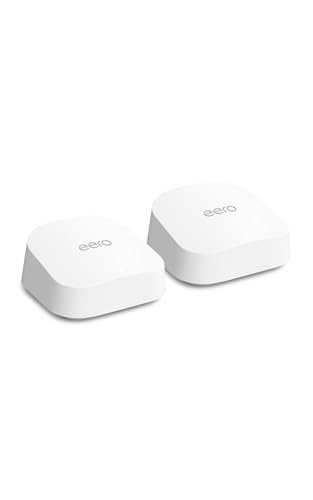
Best for: a two-node layout under 4,000 sq ft Skip it if: you want a published warranty term
The eero 7 is the lightest node in this comparison at 1.34 lb, measuring 5.12 x 5.12 x 2.52 in. eero states two auto-sensing 2.5 GbE ports and support for internet plans up to 2.5 Gbps, with wireless speeds quoted up to 1.8 Gbps. For anyone on a 2 Gbps plan who does not want to spend premium money, that port spec is the reason to look here.
It is a 2-pack, not a 3-pack, and eero claims 4,000 sq ft of coverage with 120+ devices supported. Two nodes means one backhaul hop rather than two, which is genuinely simpler to reason about. eero also states backward compatibility with all previous eero generations, so an existing node can extend the set.
Two gaps matter. The listing publishes no warranty term, unlike three of the other four picks. And with two ports per node, one of which is your WAN uplink on the primary, you get a single free port at the head end. Only one seller lists it.
Pros:
- Two 2.5 GbE auto-sensing ports per node
- Supports plans up to 2.5 Gbps per eero
- Lightest node here at 1.34 lb
- Backward compatible with earlier eero generations
Cons:
- No published warranty term
- 2-pack, so fewer nodes than the 3-pack rivals
- Dual-band, no dedicated backhaul radio
- Wired backhaul not stated in the listing
- Only one seller lists it
3. TP-Link Deco 7 Pro Tri-Band WiFi 7 BE10000 Whole Home Mesh — Best premium
The only tri-band kit here, and the only one with a stated 10G WAN/LAN port plus four 2.5G ports per unit.

Best for: a 2.5 Gbps or faster internet plan Skip it if: budget is the deciding factor
This is the most expensive pick here, and the specification sheet explains where the money goes. TP-Link states four 2.5G WAN/LAN ports plus a USB 3.0 port on each unit, a future-ready 10G WAN/LAN port, and BE10000 tri-band speeds quoted at 5,188 Mbps on 6 GHz, 4,324 Mbps on 5 GHz and 574 Mbps on 2.4 GHz.
The third radio is the part that matters structurally. TP-Link states simultaneous wired and wireless backhaul, so the 6 GHz band can carry node-to-node traffic while 5 GHz serves clients. That is the fix for a house where you cannot run cable, and no other kit in this set offers it. Claimed coverage is 7,600 sq ft with 200+ devices, the highest figures published here.
Each unit stands 6.93 x 4.23 x 4.23 in, noticeably taller than the X55, so measure your shelf gap. Warranty is 2 year manufacturer, matching the cheaper Deco. The honest verdict: unless your service plan or your client devices can use Wi-Fi 7 and multi-gig copper today, you are pre-paying for headroom.
Pros:
- Only tri-band kit in this set, with a 6 GHz backhaul lane
- Four 2.5G WAN/LAN ports plus USB 3.0 per unit
- Stated 10G WAN/LAN port for future service tiers
- Simultaneous wired and wireless backhaul stated
- 2 year manufacturer warranty
Cons:
- Most expensive pick here by a clear margin
- Tallest node at 6.93 in, awkward in tight shelving
- Wi-Fi 7 speeds need Wi-Fi 7 clients to matter
- Only two sellers list it
4. NETGEAR Orbi 370 Series WiFi 7 Mesh System — Best for pros
A 2025 Wi-Fi 7 3-pack rated by NETGEAR for plans up to 2.5 Gbps, but with the thinnest published specification sheet in this comparison.

Best for: wide single-storey coverage on a fibre plan Skip it if: you compare published specifications before buying
Model RBE373-100NAS is the newest design in this set, released in 2025, and it ships as a 3-pack of one router plus two satellites. NETGEAR claims up to 6,000 sq ft of coverage, up to 70 connected devices, and speeds up to 5 Gbps, described as 2.4x faster than Wi-Fi 6. It also states compatibility with cable or fibre ISP equipment and readiness for plans up to 2.5 Gbps.
NETGEAR's "Dual-Band technology with Enhanced Backhaul" is the interesting claim. It is dual-band, so there is no dedicated third radio, and the listing does not state a wired backhaul option. If wired backhaul is your plan, that omission is a problem you cannot resolve from the listing.
Here is where it loses ground. The listing publishes no port count, no weight and no dimensions, and the warranty is 1 Year Limited, the shortest here alongside Google WiFi. The claimed 70-device ceiling is also the lowest figure in this set, well under the 150 and 200+ numbers TP-Link quotes. It is the slowest seller of the five as well.
Pros:
- Newest release here, a 2025 Wi-Fi 7 design
- 3-pack with router plus two satellites
- Stated readiness for plans up to 2.5 Gbps
- NETGEAR claims up to 6,000 sq ft coverage
Cons:
- No published port count, weight or dimensions
- 1 Year Limited warranty, shortest in this set
- Claimed 70-device ceiling is the lowest here
- Wired backhaul not stated, and it is dual-band
- Slowest seller of the five
5. Google WiFi - AC1200 — Best for beginners
Three nodes in one box with Google Home app setup, and the simplest network here to hand to someone who does not want to configure anything.

Best for: a first mesh network with no tinkering Skip it if: you have Wi-Fi 6 or Wi-Fi 7 clients
This is the second-cheapest kit here and the only Wi-Fi 5 generation system in the set. AC1200 is a different class from AX3000 and BE10000. Google claims coverage for homes up to 4,500 sq ft across the 3-pack, with setup, device management, parental controls and guest networks all handled through the Google Home app.
The case for it is narrow but real. If you are setting up Wi-Fi for a parent's house, a rental, or a network whose clients are phones, a TV and a handful of smart plugs, AC1200 is enough and the app flow is the gentlest here. Each node measures 4.92 x 5.04 x 4.94 in in Snow white, and the box holds three of them.
For the reader this guide is written for, though, the ceiling is the whole story. No published port count. No Wi-Fi 6 or 7. A 1 Year warranty, the shortest here alongside Orbi. It also moves the slowest of these five by a wide margin, and it is the only pick whose wireless generation is two steps behind the leaders. Buy it for simplicity, never for headroom.
Pros:
- Second-cheapest kit in this set
- Three nodes included in one box
- Google Home app handles setup and guest networks
- Claimed 4,500 sq ft coverage across the 3-pack
Cons:
- Wi-Fi 5 AC1200, two generations behind the leaders
- No published port count, weight or backhaul detail
- 1 Year warranty, shortest here
- Slowest-moving pick of the five
What more money buys across these five kits
Moving up the price ladder in this set buys ports and radios, not coverage. Coverage claims run 4,500, 4,000, 6,000, 6,500 and 7,600 sq ft with no clean relationship to price at all.
- Entry position: the Deco X55 and Google WiFi. Here you get 3-packs and Gigabit-class copper at best. The X55 is the only one of the two that publishes its port count.
- Middle position: the eero 7. This buys the jump to 2.5 GbE ports and Wi-Fi 7 while dropping to two nodes.
- Premium position: the Orbi 370 and the Deco 7 Pro. Only the Deco 7 Pro spends the extra on a third radio and four 2.5G ports per unit. The Orbi spends it on a newer generation and a wider coverage claim, with less published to verify.
Note what the ladder does not buy: a longer warranty. The cheapest kit here carries 2 years, while both premium picks carry 2 years and 1 year respectively.
What the listings never tell you
None of these five listings publishes a power draw figure, a thermal rating, an operating temperature range or a mounting option. If you plan to sit a node in an airing cupboard or a garage, that silence is the risk.
Nor do they publish the actual backhaul throughput between nodes at distance, which is the number that decides whether the third node is useful or decorative. Manufacturer coverage figures are drawn in ideal conditions. My rule of thumb is to halve them for a two-storey house with solid internal walls, then check whether the remaining figure still covers your floor plan.
Two other blanks worth noting. The Orbi 370 and Google WiFi both omit port counts entirely, which for a wired-backhaul plan is the one field you cannot work around. And only the Deco pair state wired backhaul explicitly, so with the other three you are buying on the assumption rather than the specification.
The verdict
The TP-Link Deco X55 is the best budget mesh wifi system for engineers because it is the cheapest kit here and simultaneously the most wireable: 3 Gigabit ports on each of three nodes, stated wired Ethernet backhaul, a 2 year manufacturer warranty, and any unit able to take the router role. That is nine copper ports distributed around a house for less than any other kit in this set.
Two conditions flip it. First, if your internet plan exceeds 1 Gbps, the X55's Gigabit ports become the bottleneck and the Deco 7 Pro's four 2.5G WAN/LAN ports plus stated 10G port are the reason to spend up. Second, if you cannot run Ethernet between node locations, the Deco 7 Pro's tri-band design is the only one here with a 6 GHz lane it can dedicate to backhaul, and that structural advantage is worth more than any coverage claim.
The eero 7's exact advantage over the winner is narrower and cheaper than the Deco 7 Pro's: two 2.5 GbE auto-sensing ports per node and stated support for plans up to 2.5 Gbps at a middle price. If multi-gig WAN is your only unmet requirement and two nodes cover your floor plan, buy that instead.
FAQ
Is a budget mesh wifi system for engineers worth it over a single router?
A budget mesh wifi system is worth it when a single router leaves rooms unserved, and only then. A three-node kit like the Deco X55 also gives you 3 Gigabit ports in each of three locations, which a single router cannot. If your whole floor plan already has strong signal from one box, add a switch instead.
Which is better value, the Deco X55 or the eero 7?
Better value between the Deco X55 and the eero 7 depends entirely on your service plan. The X55 is cheaper, ships three nodes instead of two, publishes a 2 year warranty and states wired backhaul. The eero 7 counters with two 2.5 GbE ports per node and support for plans up to 2.5 Gbps. Under 1 Gbps service, take the X55.
How many Ethernet ports does each mesh node actually need?
Each mesh node needs at least two Ethernet ports: one for the incoming link and one for a wired device. Three is better, because the primary node uses one for WAN. The Deco X55 publishes 3 Gigabit ports per unit and the Deco 7 Pro publishes four 2.5G ports plus USB 3.0. Two picks here publish no port count at all.
Do the coverage figures on these listings mean anything?
Coverage figures on these listings are manufacturer claims measured in favourable conditions, ranging from 4,000 sq ft on the eero 7 up to 7,600 sq ft on the Deco 7 Pro. Solid walls, foil insulation and metal appliances all cut them. Halve the quoted number for a two-storey build, then check the remainder still reaches your furthest room.
What is the most common mistake buying a mesh kit?
The most common mistake buying a mesh kit is choosing by the headline wireless number instead of the backhaul design. AC1200 versus BE10000 tells you almost nothing about throughput at the third node. Whether the nodes can talk over Ethernet, or over a dedicated 6 GHz radio, is what decides real performance in a multi-node install.
Start by walking the route between the two rooms your nodes will occupy, and decide whether a cable can get there. That single answer collapses this whole comparison. Cable is possible: buy the Deco X55, wire the backhaul, and spend the savings on a switch. Cable is impossible: buy the Deco 7 Pro for its 6 GHz backhaul lane and accept the price. The X55 earns its top spot because it is the only kit here that is both the cheapest option and the one with the most copper, which is a combination you rarely get to choose.